

Did you know your Copilot Studio agent can use a computer just like a person?
Most automations require APIs, connectors, or custom integrations. But some legacy apps and internal portals don’t have APIs at all. That’s where Computer Use comes in. Your agent sees the screen, understands the UI, and interacts with it — clicking buttons, filling forms, navigating menus, and reading results — exactly the way a human would.
How it works
Computer Use gives your agent the ability to control a browser session or virtual desktop. You describe the task in natural language, and the agent figures out the sequence of clicks, keystrokes, and navigations needed to complete it. Under the hood, it uses vision capabilities to interpret what’s on screen and a reasoning model to decide the next action.
No API. No connector. No RPA script to maintain. Just tell the agent what to do.
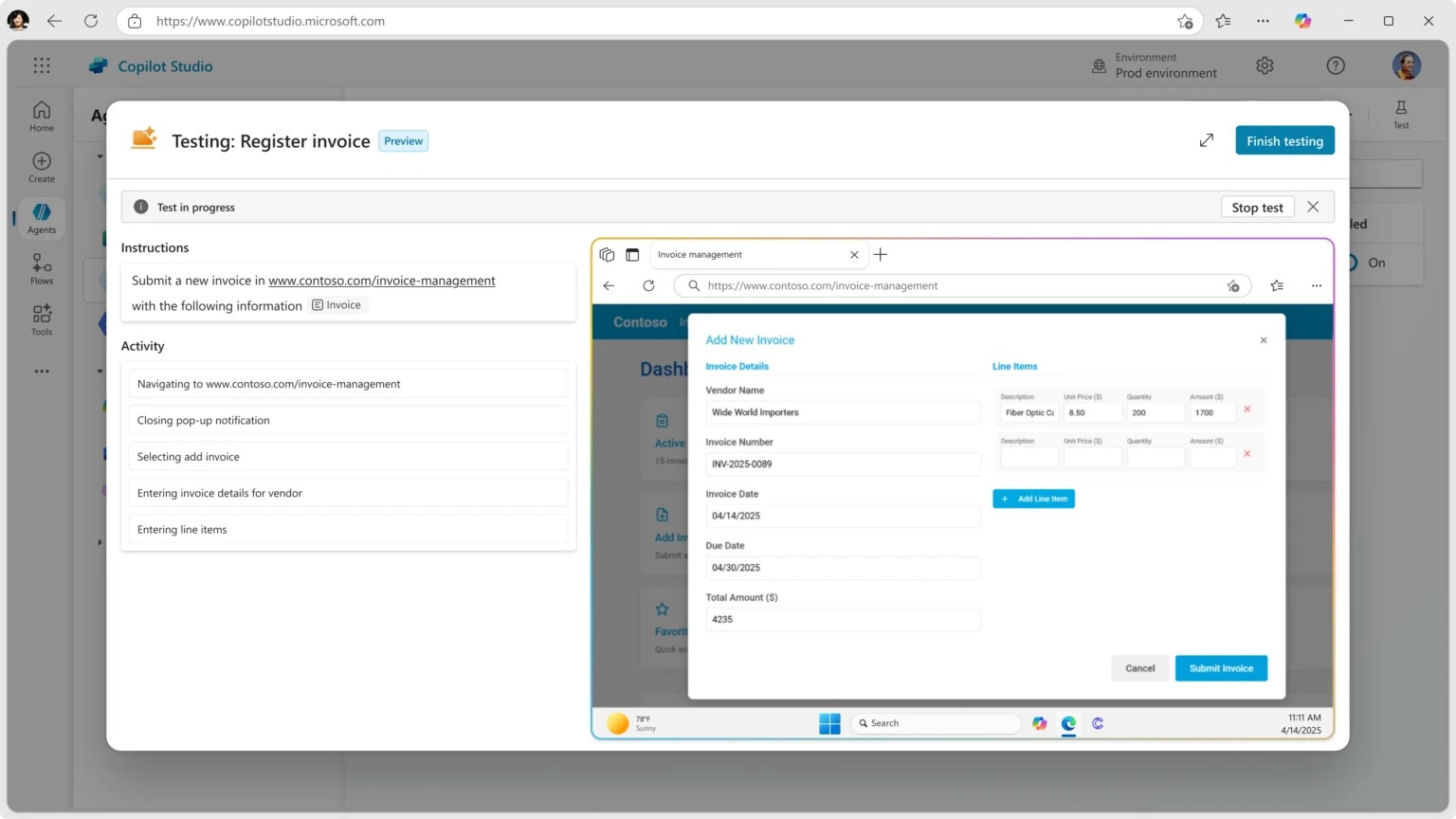
Setting it up in Copilot Studio
- Open your agent and go to Actions → Add an action → Computer Use.
- Describe the task in plain language, e.g., “Go to the expense portal, create a new expense report, fill in the vendor name, amount, and date from the user’s message, and submit it.”
- Configure the target environment — this is the browser or desktop session where the agent will operate.
- Add guardrails — specify what the agent should do if something unexpected appears on screen, like a confirmation dialog or an error message.
- Test it in the Test pane. You’ll see the agent navigate the UI step by step.
Example: automating a legacy HR portal
Imagine your company has an internal HR portal with no API. Employees need to log in, navigate three menus deep, fill out a form, and click Submit — just to request a day off.
With Computer Use, you build an agent that handles this conversationally:
- Employee says: “I need to take PTO next Friday.”
- Agent: Opens the HR portal, logs in, navigates to the PTO request page, selects the date, fills in the reason, and submits.
- Agent replies: “Done! Your PTO request for Friday March 27 has been submitted. You’ll get a confirmation email from HR.”
The employee never touches the portal. The agent did all the clicking.
Why this changes the game
- No API required — automate apps that only have a UI, including legacy systems, third-party portals, and vendor tools.
- Natural language instructions — describe the task like you would to a colleague, not in code or flow steps.
- Self-correcting — if the agent encounters an unexpected dialog or error, it reasons about what to do next instead of crashing.
- Combined with other actions — chain Computer Use with connector actions, knowledge sources, and topics in the same agent. Use an API where you can, use Computer Use where you can’t.
The key insight: Computer Use bridges the gap between what you can automate with APIs and what you’ve been doing manually. Every app with a screen is now an app your agent can operate. 🖥️
💬 Comments & Suggestions
Share your thoughts, tips, or drop a useful link below.