

Did you know that the steps your team uses to qualify a lead, approve a discount, or onboard a vendor can now live in Dataverse as a natural-language “business skill” — and every AI agent your organization runs can discover and follow it automatically?
Most institutional knowledge lives in three places: a Word doc nobody opens, a flow somebody built two years ago, and the heads of the two senior employees who actually know how things work. The moment you point an AI agent at it, you start re-implementing that knowledge inside the agent — and again in the next agent — and again the next time the process changes.
Business skills, now in public preview in Dataverse, fix that.
What a business skill actually is
A business skill is a record stored centrally in Dataverse that captures one of your organization’s processes, policies, or pieces of domain expertise as natural-language instructions — the steps, the information required, and the business rules that apply.
Think of it as a runbook the agent reads and follows:
- “How do we qualify an inbound lead?”
- “How do we approve a discount over 15%?”
- “How do we run an onsite HVAC inspection — what questions to ask, by equipment class?”
- “How do we onboard a new vendor — accounts, documents, approvals, due-diligence checks?”
You write the steps once, in plain language. Agents do the rest.
How agents pick them up: the Dataverse MCP server
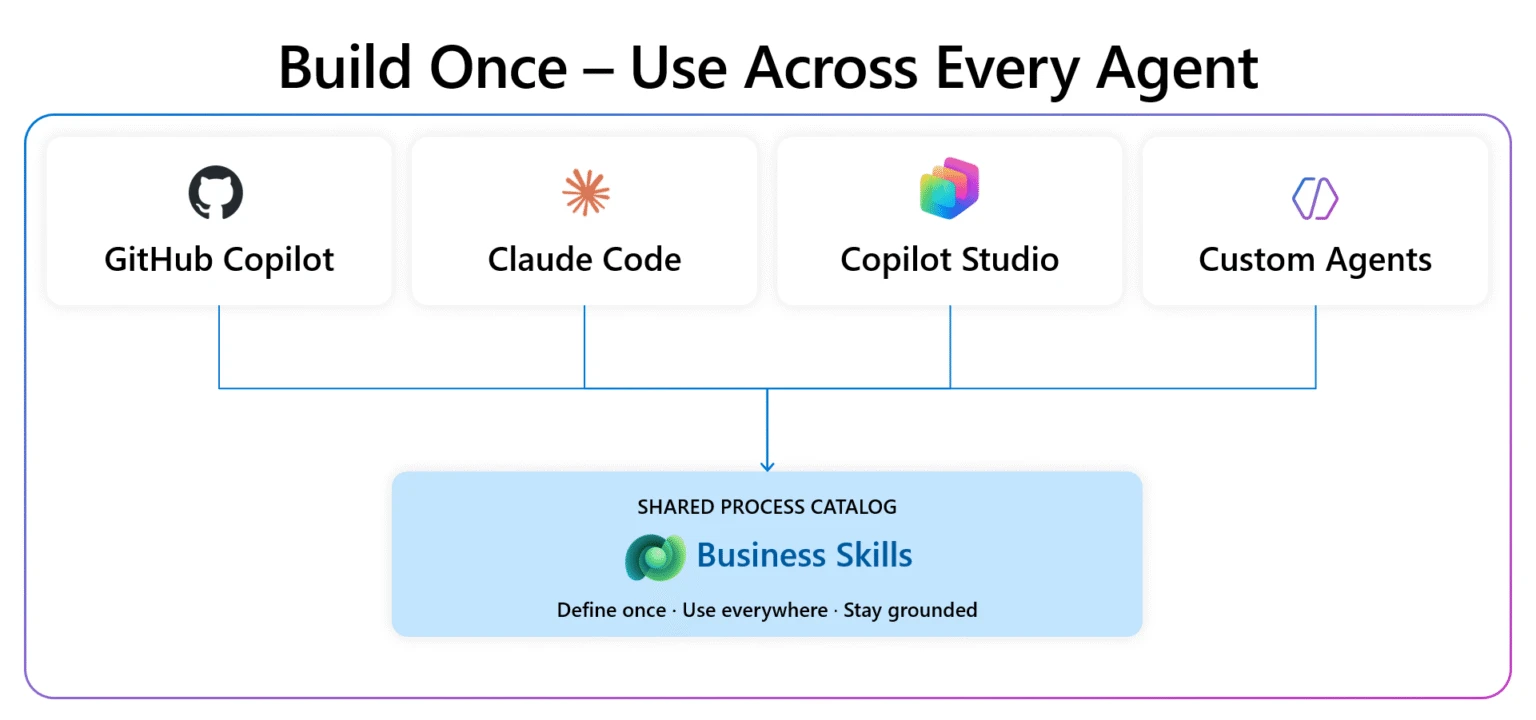
Business skills are surfaced through the Dataverse MCP server. Any agent connected to that server discovers relevant skills automatically at runtime and uses them to complete tasks against your Dataverse data — according to your organization’s standards.
Because they live in Dataverse and ride on MCP, the same skill works across every MCP-compatible client:
- Microsoft Copilot Studio
- GitHub Copilot
- Visual Studio Code
- Azure AI Foundry
- Any other MCP client your team uses
Define a skill once, and every agent that should follow it does — without you porting logic between platforms.
Why “central in Dataverse” is the magic word
This is the bit makers usually miss. Storing a skill once in Dataverse instead of once per agent changes the operating model:
- Each agent re-implements the process — drift is guaranteed.
- Process change = N agent updates, N publishes, N test cycles.
- Sharing means exporting/importing topics, copying flow JSON, or porting code.
- Governance is per-agent, fragmented across tools.
- One skill record — every connected agent discovers and follows the same steps.
- Update the skill once — every connected agent picks up the change immediately.
- Share the skill record (Dataverse security applies) or deploy it via solutions.
- Skills are solution-aware and governed centrally with built-in sharing and visibility.
No republishing. No tracking down individual agent configurations. Update the source of truth and the change applies everywhere.
Create, share, and govern from Power Apps
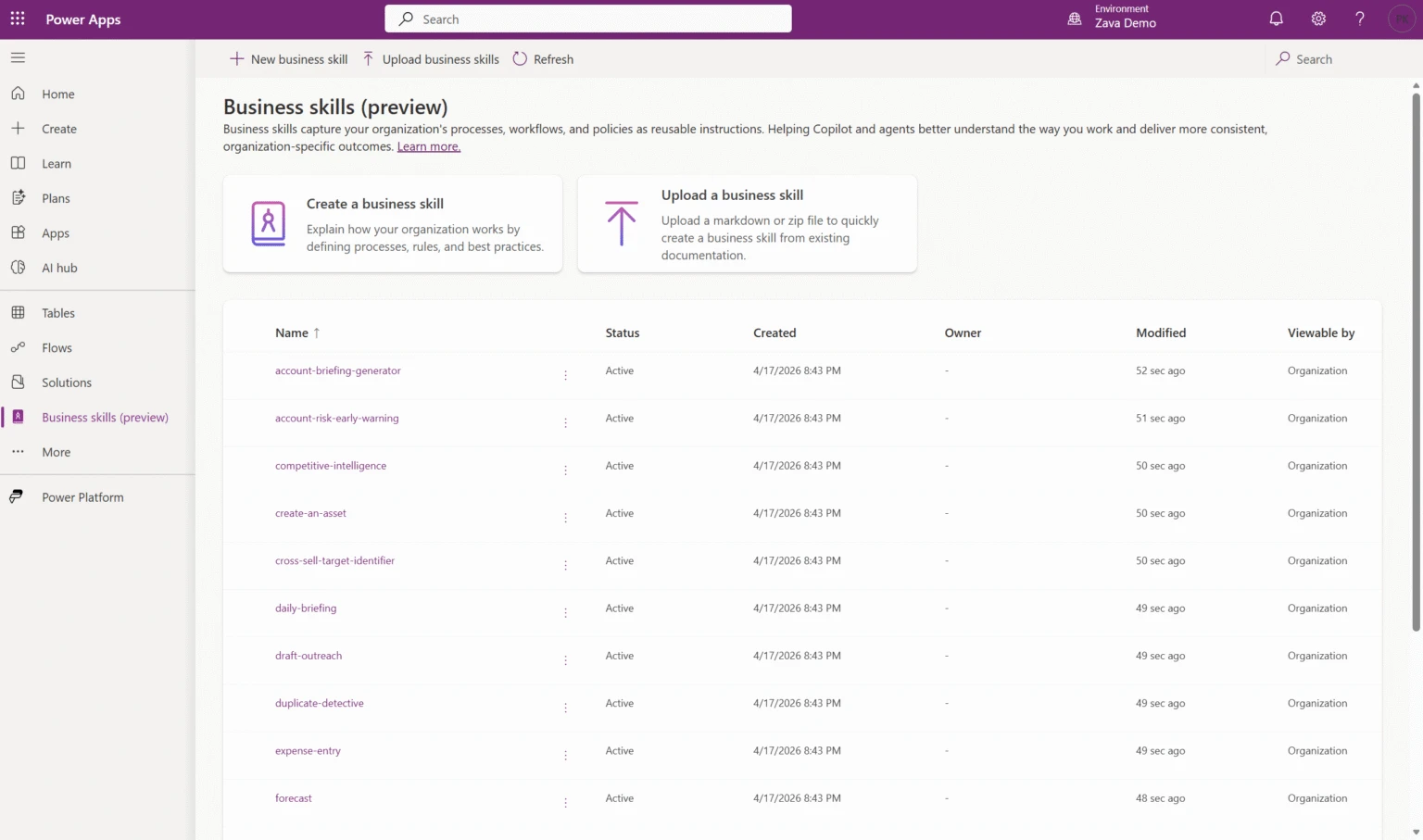
Business skills live in Dataverse, but you author and manage them in Power Apps. From make.powerapps.com you can:
- Create a skill by writing the process in natural language, or upload existing documentation (an SOP, a runbook, a process Word doc) and let it become the skill.
- Share with specific people, teams, or security roles using the standard Dataverse sharing model.
- Govern with built-in visibility controls — who can see it, who can edit it.
- Deploy across environments by adding the skill to a Power Platform solution and shipping it through your existing ALM pipelines.
Prefer to work conversationally? You can create and update skills by asking an agent, through the Dataverse MCP server itself.
A real customer example
Velrada built Inspection Agent to help worksite supervisors and field workers track equipment maintenance. The agent uses business skills to drive the inspection itself: for an onsite HVAC check, it invokes a skill that determines the right questions for that equipment class, looks up the last inspection outcomes, and pulls in historic issues — producing a consolidated, conversational report and follow-up guidance.
Update the inspection process for HVAC units, and every Inspection Agent in the field follows the new steps the next time it runs. No app updates. No re-deployments.
Who this is for
Business skills are aimed at three audiences:
- Makers who want to codify how their team actually operates instead of re-explaining it to every agent.
- Agent builders who need agents to follow real, organization-specific processes — not generic LLM instructions.
- Admins who need governance over how business knowledge is shared, versioned, and deployed across environments.
Get started
To switch this on today (public preview):
- Enable Dataverse intelligence in the Power Platform admin center for the target environment.
- Open Power Apps and go to the Business skills page from the left navigation.
- Create your first skill — write it in natural language or upload an existing process document.
- Connect an agent to the Dataverse MCP server and watch it discover and follow the skill.
Want a head start? Microsoft ships a sample business skills repository on GitHub with production-ready examples you can install directly into your environment.
If you’re already building agents, business skills are the missing layer between what the agent knows and what your organization actually does. Start small: pick one process that’s currently re-implemented in two or more agents, write it as a business skill, and rip the duplicates out. The first time the process changes and you only edit it in one place, you’ll feel the difference.
💬 Comments & Suggestions
Share your thoughts, tips, or drop a useful link below.