

Did you know that Power Platform Pipelines can require a passing code review — for canvas apps, Power Automate flows, and Copilot Studio agents — before a solution is even exported from the development environment?
Most teams stop at Solution Checker. Solution Checker is great for platform-level safety (deprecated APIs, security smells, supportability), but it doesn’t grade craftsmanship: control naming, formula complexity, delegation issues, topic design in agents, trigger phrase quality, and the dozens of other things that separate a healthy solution from one that will haunt you in production.
The good news: you can wire Solution checker enforcement (at the environment) + Power CAT Tools Code Review (for craftsmanship) + Copilot Studio Kit (for agent governance) + Power Platform Pipelines gated extensions (the glue) into a single multi-dimensional quality gate. None of these are new tools — they’re just rarely combined.
Layer 1 — Solution Checker, enforced at the Managed Environment
This is the foundation. Solution Checker enforcement is configured per Managed Environment, not per pipeline. When set to Block, any solution with critical issues is rejected at import time — before anything changes in the environment — regardless of whether it arrived through a pipeline, a manual import, or DevOps.
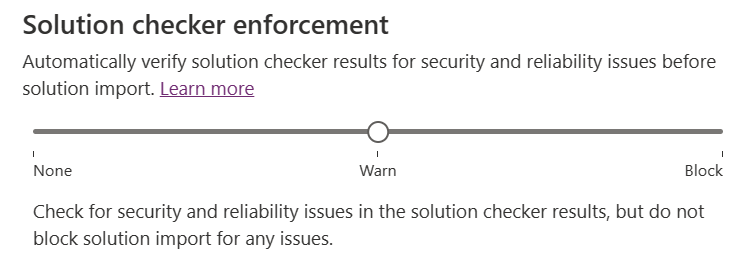
Set this once on each target environment (or, even better, on an environment group so every member environment inherits it — pair this with the Default Deployment Pipeline rule and you get governance-by-default for every new environment).
But Solution Checker won’t tell you that a canvas app has 800 controls on one screen, or that a Copilot Studio topic has only one trigger phrase. That’s where layer 2 comes in.
Layer 2 — Power CAT Tools: real code review for makers
The Power CAT Tools suite ships a Power Platform Code Review tool that analyzes solutions against a customizable checklist of patterns. Some patterns are evaluated automatically (control counts, media size, network traces, formulas), others are marked pass/fail by a reviewer with comments and links back to specific code locations.
What it covers today:
- Canvas apps — control limits, embedded media, slow network requests, formula breakdowns, App Checker integration.
- Power Automate — flow patterns from
POWERAUTOMATE_PATTERNS.md. - Copilot Studio agents — the Copilot Studio Agent patterns: trigger phrase count, single-word phrases, long phrases, condition count, flow count, SharePoint auth mode, unused topics, synonyms quality, duplicate regex entities, end-of-conversation usage.
A review produces a summary dashboard (passed / failed / pending patterns) plus detailed insights — all stored in Dataverse tables in the governance environment. That’s the key: the results are queryable.
Layer 3 — Copilot Studio Kit for agent governance
For Copilot Studio agent solutions, the Copilot Studio Kit adds the behavioral dimension that even Power CAT can’t see: conversation analytics, escalation rates, topic coverage, session quality. If your pipeline is shipping an agent, the agent’s runtime data is part of the review, not just its design.
Layer 4 — Power Platform Pipelines gated extensions
This is what turns the above from “tools we have” into “gate every deployment must pass.” Power Platform Pipelines exposes three gated extensions — custom steps you can insert into a deployment and signal complete or reject:
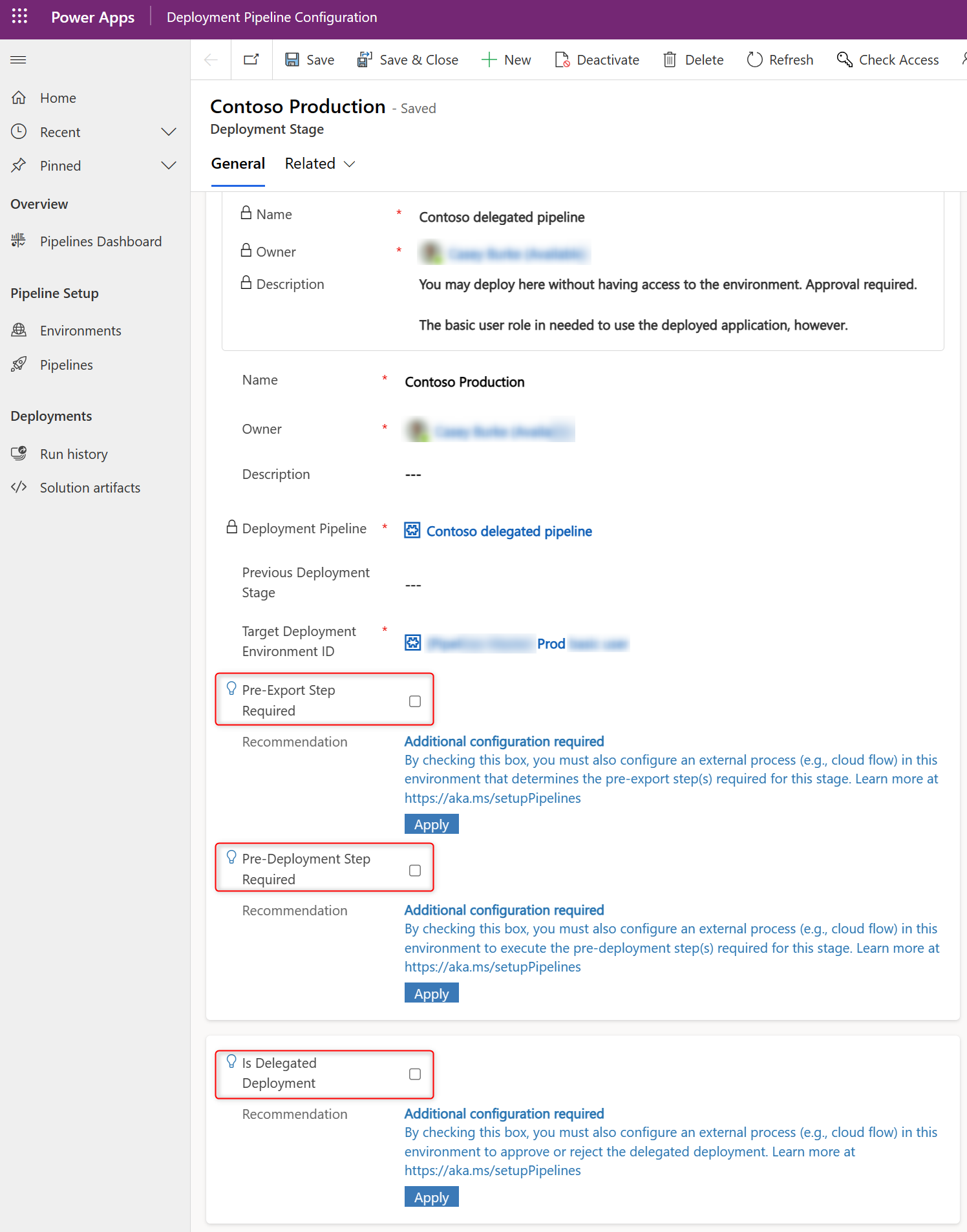
- Pre-export Step Required — fires
OnDeploymentRequested. Runs before the solution is exported from the dev environment. Only enabled on the first stage (e.g., Dev → UAT). This is where you put the code-review gate. - Is Delegated Deployment — for service-principal-based approvals.
- Pre-deployment Step Required — fires
OnPreDeploymentStartedafter approval, before the deployment runs in the next environment.

Each gated step stays pending until your custom logic calls back with the right action:
UpdatePreExportStepStatus(orUpdatePreDeploymentStepStatus) with status 20 = complete, deployment continues.- Same action with status 30 = reject, deployment fails. You can include both maker-facing comments (“Your canvas app has 412 controls on screen
BrowseGallery1— please refactor before resubmitting”) and admin-facing comments.
Putting it together: the gate flow
In your pipelines host environment, build a cloud flow that:
- Triggers on
OnDeploymentRequested(Dataverse → When an action is performed → category Power Platform Pipelines) — optionally filtered by pipeline name with a trigger condition like@equals(triggerOutputs()?['body/OutputParameters/DeploymentPipelineName'], 'Contoso Pipeline'). - Identifies the solution being deployed from the trigger output parameters.
- Queries the governance environment (Power CAT Tools Dataverse tables) for the most recent Code Review record for that solution. Decision logic, for example:
- Reject if no review exists in the last N days.
- Reject if any critical pattern is marked Failed.
- Reject if the pass rate is below your threshold.
- For Copilot Studio agent solutions, additionally query Copilot Studio Kit data for the agent’s quality scores.
- Calls
UpdatePreExportStepStatus(Dataverse → Perform an unbound action) with status20and a confirmation comment, or status30with a reject comment listing exactly what failed.
The maker sees the result inline in the pipeline run history — including your comments — and either fixes the issues and resubmits, or proceeds. The solution isn’t even exported until the gate clears.
Microsoft ships a PipelinesExtensibilitySamples managed solution with starter flows for all three gated extensions — start there and replace the placeholder logic with your Power CAT / Copilot Studio Kit lookups.
Why this combo is the magic, not just one of them
Each layer covers what the others don’t:
| Layer | What it catches | What it misses |
|---|---|---|
| Solution Checker (env-enforced) | Platform safety: deprecated APIs, supportability, security smells | Craftsmanship, agent design, performance design |
| Power CAT Code Review | Canvas/Flow/Agent design patterns, control counts, formula quality, trigger phrases | Runtime behavior, security policies |
| Copilot Studio Kit | Agent runtime quality: escalation, resolution, topic coverage | Build-time design issues |
| Pipelines gated extension | The mechanism that enforces all of the above on every deployment | (the glue) |
Run all four and your pipeline stops being a deployment mechanism — it becomes a maker enablement loop. Every deployment teaches the maker something concrete and gives them a self-service path to fix it. No manual code reviews, no admin tickets, no “we’ll check it later in production.”
A note on staging the rollout
Don’t enable rejection on day one — you’ll create a riot. The recommended ramp:
- Sprint 1–2: Build the gate in observe-only mode — always call
UpdatePreExportStepStatuswith status20(complete) but log what would have been rejected. - Sprint 3–4: Switch to warn mode — complete the step but post the would-have-been-rejected comments to the maker so they see what’s coming.
- Sprint 5+: Flip to block — start rejecting on the patterns the team has agreed are non-negotiable. Keep the rest as warnings.
Same staging works for the Solution Checker enforcement on Managed Environments (Off → Warn → Block).
This is one of those quiet-but-powerful combinations that the platform fully supports today — almost nobody connects all the pieces. If you already have pipelines and Managed Environments, you’re three configuration steps and one cloud flow away from automated, multi-dimensional code review on every deployment.
💬 Comments & Suggestions
Share your thoughts, tips, or drop a useful link below.