

Did you know that spreading your flows across more service accounts gives your tenant exactly zero additional Power Platform requests?
 There is a right order to climb. Most teams skip straight to the expensive steps.
It is one of the most common reactions when the throttling banners start appearing: create another account, move some flows to it, buy yourself some headroom. It feels like load balancing. It is not. The limits you are hitting are mostly not tracked where you think they are, and the ones that hurt most don’t care who owns the flow at all.
First, understand what you are actually looking at
Before you spend anything, be clear about which numbers you are reading.
Every organization is currently in a transition period. Enforcement is less strict and the limits actually applied are more generous than the official ones. During the transition, those limits are applied at the cloud flow level rather than the user level: a Power Automate Premium user has an official limit of 40,000 requests per day, but 200,000 per cloud flow during the transition. A Process license is 250,000 officially and 500,000 during the transition. There is also a separate transition cap of 1,000,000 cloud flow actions per user per day.
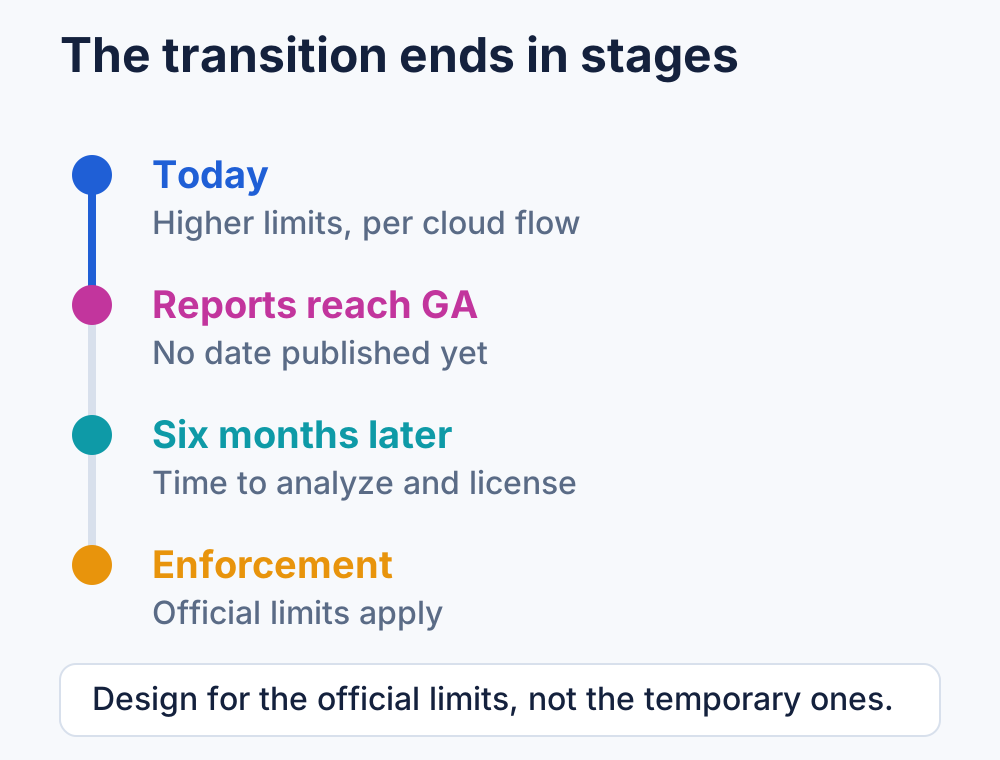 The clock only starts when reporting reaches general availability, and nobody has published that date yet.
Two consequences matter:
- Build against the official limits, not the transition ones. The transition ends after the Power Platform admin center reports become generally available, and organizations then get six months to analyze usage and buy appropriate licenses before strict enforcement begins.
- The reports do not yet show everything. Power Platform request reporting is still in preview and currently covers Power Automate API requests only. Requests from Dataverse, Power Apps, and Microsoft Copilot Studio are not included. Whatever number you are looking at, your real platform consumption is higher.
There are known reporting quirks too. In the licensed user report, entitlements appear per user per day per environment even though the limit applies per user per day, and users licensed through Power Apps per app show an entitlement of 0 when it should be 6,000. Read the consumption column with confidence; read the entitlement column with care.
The ladder, in the right order
Treat this as an escalation plan. Only move to the next step if the previous one genuinely isn’t enough.
1. Optimize the flows. This is the cheapest step and usually the one with the largest return, because request consumption is driven by design, not by volume alone. Every trigger and every action counts as one request, and that includes built-in ones like Compose or Initialize Variable. Actions inside a loop run once per iteration, so a loop with 2 actions and 10 iterations costs 21 requests, not 3. Both succeeded and failed actions count. Retries and the extra calls generated by pagination count as well. Skipped actions don’t.
So the levers are concrete:
- Reduce trigger frequency, especially on polling triggers. Many flows running every minute or every hour can run far less often.
- Add trigger conditions so the flow doesn’t start at all for events you will discard in the first branch.
- Use
Filter queryandTop counton connector actions to retrieve fewer items instead of looping through everything. - Cut unnecessary retries and pagination. Both are silent multipliers on your daily count.
- Store a reused property with
Initialize Variableinstead of referencing a large action output repeatedly, because referencing one property passes the entire output of that action into the next one.
2. Process license. If the flow is already lean and still heavy by nature, this is the highest action entitlement available: 250,000 requests per day, applied to the flow rather than to a user. It is also stackable — up to 10 Process licenses on a single cloud flow, each adding another 250,000 requests per day. The flow must be in a solution before a Process license can be assigned. This is the step people most often get wrong, so it is worth stating plainly: if one flow exceeds its entitlement, stack more licenses on that same flow rather than splitting the workload across flows or owners.
3. Pay-as-you-go. Link the environment to an Azure subscription and users and flows in that environment stop being throttled above their daily allocation — you pay only for the actions consumed above the limit, billed to the subscription. Flows still need a base license underneath. This is the right answer when consumption is genuinely spiky or hard to forecast, because you stop managing ceilings altogether.
4. Capacity add-on. Each Power Platform request capacity add-on raises a limit by another 50,000 requests per 24 hours, and multiple add-ons can be assigned. Check the current conditions in the documentation before you plan around it: during the transition period these add-ons cannot be assigned to users or flows, and Microsoft’s guidance is to buy them to stay within license terms and be ready for when the transition ends, raising a support ticket if you need relief for a flow being throttled today.
Why more service accounts is not the answer
This is the part that contradicts the instinct, so here are the concrete reasons.
The capacity you would be splitting is already shared. When a flow’s owner is a service principal, the flow consumes the non-licensed user limits, and those are pooled at the tenant level. The documentation is explicit that application users, non-interactive users, administrative users, and the SYSTEM user do not each get their own limit — they share the tenant pool. For Power Automate that pool is 25,000 base requests per day with no per-license accrual. Creating a second, third, or tenth identity divides the same pool into more slices. It does not create a new one.
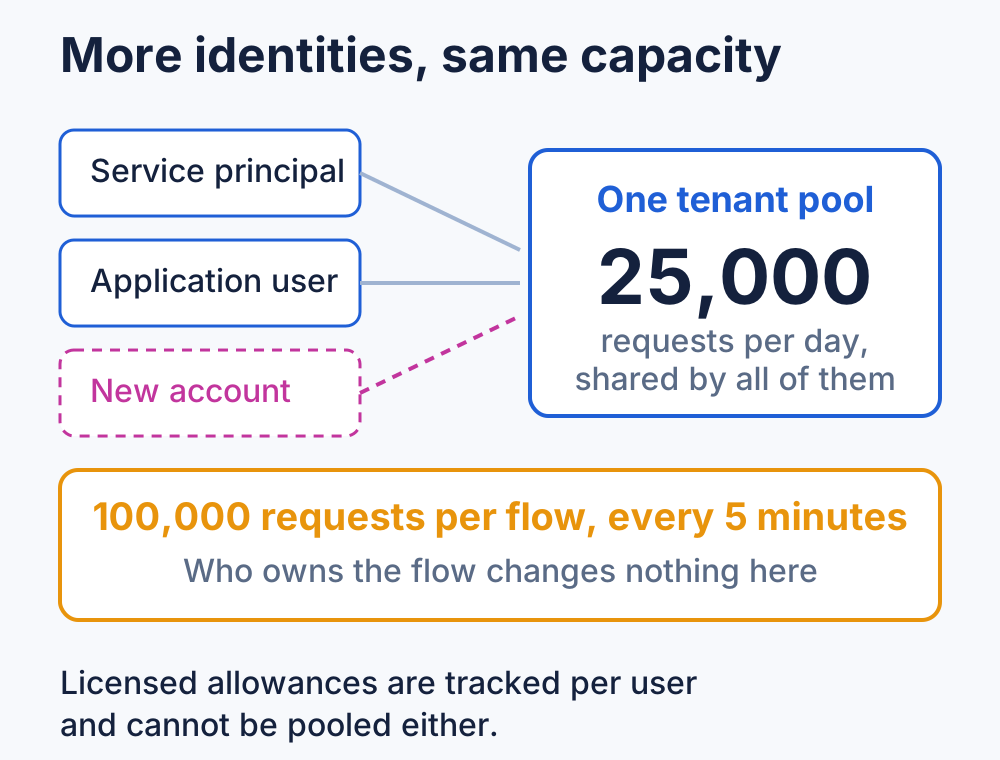 More identities change who is drawing from the bucket, never how much is in it.
Licensed limits aren’t poolable either, in the other direction. Capacity is tracked per individual user and per licensed flow, and it explicitly cannot be pooled at environment or tenant level. Eight users with 6,000 requests each are eight separate 6,000 allowances, never one shared 48,000. Moving ownership around just moves which allowance gets consumed.
It does nothing to the limits that aren’t license based. There is an independent limit of 100,000 requests per five minutes, applied at the flow level and independent of the license — a flow with a Process license may have 250,000 requests for the day but still cannot spend more than 100,000 of them in any five-minute window. Connector limits behave the same way: a single SharePoint connection is capped at 600 operations per minute no matter how many flows use it, and service protection limits apply per service regardless of who owns anything.
It fragments reporting and ownership. The admin center reports already list callers individually, with caller types of System and Non-Interactive/Application. Splitting a solution across several identities scatters its consumption across several rows and several owners, which makes attribution harder, complicates ALM, and leaves you with accounts nobody wants to be responsible for.
Some of it isn’t even supported. Non-interactive users are capped at seven per tenant and are not supported by Power Automate, so that is not a lever. And sharing one service account’s credentials across a group of users so they can run premium flows under a single license is multiplexing, which is a license violation — not a capacity strategy. Microsoft’s guidance is that service accounts are not a best practice at all, and that running flows under a service principal as owner is preferable.
None of this means one service identity is the correct number. Multiple service identities are perfectly reasonable when there is a real architectural reason: separating distinct business capabilities, or enforcing a security boundary between workloads with different data access. That is design. Creating identities to inflate a daily ceiling is accounting, and the platform does not honor it.
How to find the real consumers
You can only optimize what you can attribute. In the Power Platform admin center, go to Licensing > Capacity add-ons, then on the Summary tab scroll to the Add-ons section and select Download reports. Choose Microsoft Power Platform requests and pick the scope you need.
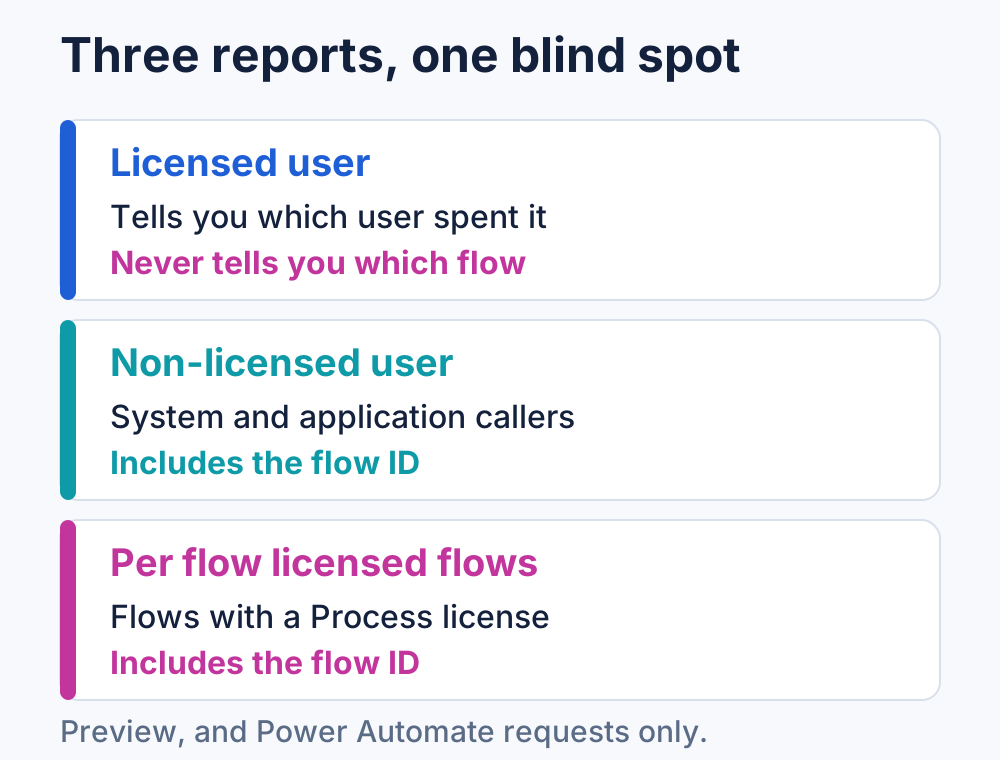 Only two of the three reports tell you which flow spent the requests.
Each scope answers a different question, and each has a blind spot:
- Licensed user — consumption per user per day against their entitled quantity. Note what is missing: there is no flow or resource ID, so you can see that a user burned their allowance but not which of their flows did it. Caller ID can also be null or empty.
- Non-licensed user — consumption for System and Non-Interactive/Application callers, plus the tenant’s total non-licensed entitlement. This one does include a resource ID, which for Power Automate is the flow ID, although it can also come back empty.
- Per flow licensed flows — consumption and entitlement for flows carrying a Process or per-flow license, with the caller ID being the flow itself. Environment region is not available during preview.
Because identifiers can be empty and the licensed user report has no flow ID at all, mapping consumption back to a solution usually means cross-referencing these exports with your own flow inventory — flow IDs, owners, and the solution each flow belongs to. If you don’t have that inventory, build it before you buy anything.
On the maker side, open a flow’s details page and select Analytics, then the Actions tab, to see how many actions it actually runs. And treat the warnings seriously: a flow that stays above transition period limits for 14 consecutive days is suspended, with a notification to the owner.
Capacity is an architecture problem
Passing your request limits is useful information. It tells you that a flow triggers more often than the business needs, that a loop is iterating over rows you could have filtered out server side, or that a genuinely high-volume process has outgrown a user license and needs to be licensed as a process.
What it never tells you is that you need more accounts. Redistributing work across identities changes the labels on the consumption, not the consumption itself — and it leaves you with a more fragmented estate, harder attribution, and the same throttling a month later. Optimize first, license the flow that actually does the work, and let the ceiling be a design signal rather than something to route around.
💬 Comments & Suggestions
Share your thoughts, tips, or drop a useful link below.