

Did you know that neither environment routing nor a DLP policy stops a maker from building in your default environment?
 Two layers, two different jobs. Neither of them is a lock.
Every tenant reaches this moment. The default environment grew on its own, nobody planned it, and now there are hundreds of apps and flows inside it — some abandoned, some quietly business-critical. You want to stop the growth without stopping the organization, and the two tools everyone points you at are environment routing and data loss prevention policies.
They are the right two tools. But both of them are routinely credited with powers they do not have, and that gap is where a false sense of control comes from. This article is the concrete mechanics of each layer, and — more importantly — the honest boundary of each one. If you have not settled the bigger picture yet, start with your environment strategy matters more than any toolkit you install; this one is what you do once that decision is made.
Layer one: environment routing
Environment routing changes where a maker lands when they open a maker portal. Instead of dropping into the shared default environment, they get their own personal developer environment, created automatically on first sign-in and named after them.
Here is the configuration, step by step:
- In the Power Platform admin center, go to Manage > Tenant settings > Environment routing. The panel is called Create and manage environment routing rules.
- Turn routing on for the maker portals you actually use. Routing currently covers Microsoft Copilot Studio, Power Apps, and Power Automate cloud and desktop flows. It does not cover Power Pages, so a Power Pages maker still lands wherever they landed before.
- Create a routing rule. You can target Everyone, or a specific security group. For a first rollout, target a security group — a dozen willing makers will tell you more in a week than a tenant-wide switch will tell you in a month.
- Select an environment group for the developer environments the rule creates. This is the step people skip, and it is the one that matters: the new environment arrives already configured as a managed environment with every published rule of that group applied from the start — and those rules now include a connector policy, which we get to below.
- Save and check rule order. When a maker opens a portal, the rules are evaluated in order and the first matching rule wins, so a broad “Everyone” rule sitting above a narrower one will swallow it.
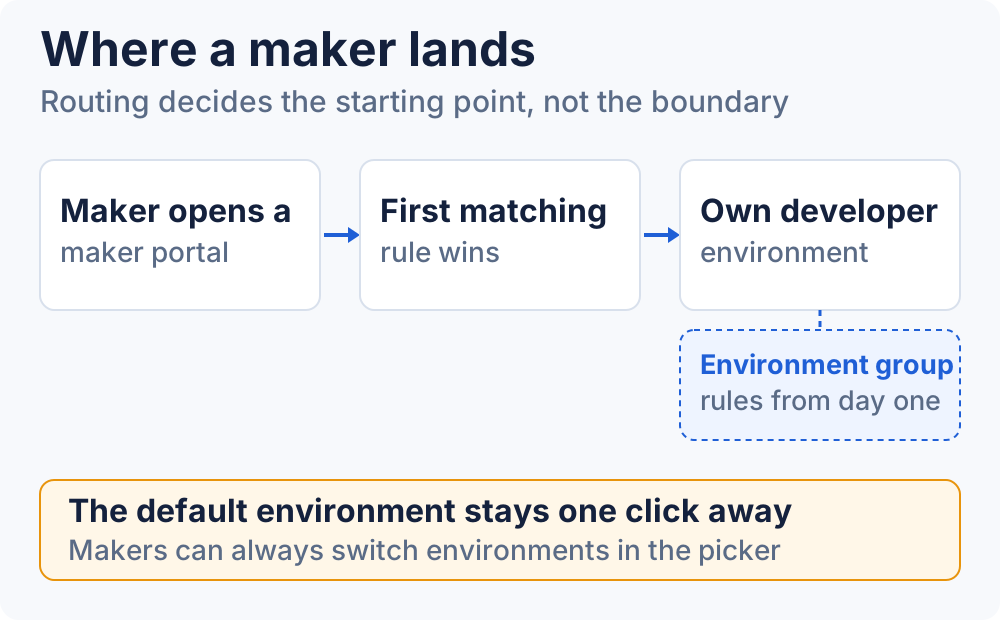 The environment group is what turns a new personal environment into a governed one on day one.
The developer environment type is fixed and cannot be changed later, and these environments do not consume your Dataverse capacity — which is usually the objection that comes up first in the room.
What routing does not do
This is the part worth being precise about, because the assumption is so common. Routing decides where a maker starts. It does not decide where a maker can go.
Microsoft Learn answers it directly in the routing FAQ. Asked whether new makers can switch to the default environment or other environments after their own developer environment is created, the documentation says: “Yes, makers can always switch to other environments.”
So routing reduces new development in the default environment, and it does that well. What it does not do is prevent it. A maker who knows the environment picker exists — and they all learn — can go straight back to the default environment and build there tomorrow. If creation in the default environment genuinely has to be controlled, routing is one input, not the answer: you pair it with the governance controls on that environment and you move the critical solutions out to environments that were designed for them.
Layer two: a DLP baseline
The second layer is a data policy, and the most durable shape for it is a restrictive tenant-level baseline with deliberate exceptions, rather than a pile of per-environment policies that nobody can reason about.
- Scope one tenant-level policy to everything, using Exclude certain environments to carve out only the production or project environments that are explicitly governed on their own terms.
- Put approved Microsoft 365 and line-of-business connectors in the Business group. Connectors in a group cannot share data with connectors in another group, which is the whole mechanism.
- Put personal and unapproved connectors in Non-business, or in Blocked if they have no place in your tenant at all.
- In the default environment, set the default group for new connectors to Blocked. The setting is called Set default group, on the Pre-built connectors step of the policy. New connectors then arrive blocked and have to be reviewed rather than silently becoming available. Worth knowing: connectors that cannot be blocked land in Non-business regardless, because by design they cannot be blocked.
- Add environment-specific policies only for justified exceptions. When several policies apply to the same environment, Learn is explicit: “the most restrictive policy applies to the combination of connectors.” And an environment-level policy can never loosen a tenant-wide one — “Environment data policies can’t override tenant-wide data policies.”
- Validate against a representative sample of existing apps and flows before you enforce. This is not optional politeness. When a policy starts applying, an app that violates it goes into a suspended state and its connections are disabled — enforcement usually lands within an hour, and can take up to 24. A policy you did not test is an outage you scheduled without knowing it.
The newer option: advanced connector policies
Before you invest heavily in the classic model, know that there is a second generation of this layer. Advanced connector policies, currently in preview, drop the Business / Non-business / Blocked classification entirely in favour of “a strict allowlist that blocks all connectors by default.”
Three things matter when you decide how much to lean on them:
- Where they live. For one environment: Security > Data and privacy > Advanced connector policies. For a whole group: Manage > Environment groups > the group > Rules > Advanced connector policies. That second path is the one that pairs with layer one — a routed developer environment inherits the group’s rules, connector policy included, from the moment it is created.
- They coexist with what you already have. By default they run in mixed mode alongside classic data policies, with “a combined policy that merges the most restrictive settings from both.” There is also an ACP-only mode where classic policies are ignored — not deleted, just no longer evaluated for that scope.
- Coverage is not complete yet. They support certified connectors only: “Custom connectors and HTTP connectors aren’t yet supported”, and virtual connectors are not on the roadmap at all. For those, classic data policies are still the tool. The upside is on the other end — on a managed environment, single or through a group, you can block any connector or any action, including the ones that are non-blockable in a classic policy.
That last point is the practical argument for combining the two layers rather than picking one. Routed developer environments are managed environments, so a connector policy applied through the group is enforced there without the non-blockable escape hatch.
What connector policies do not do
A connector policy — classic or advanced — governs which connectors can be used and combined. That is the entire scope. It does not stop anyone from creating an app.
It is also narrower than people assume even within its own lane. From the Learn overview: “Data policies are connector aware, but they don’t control connections made using the connector. In other words, data policies can’t determine whether the connector is used to connect to a development, test, or production environment.”
So this layer is a data control, not a creation control, and the advanced version does not change that. Someone can still build in the default environment all day; they just cannot reach the connectors you did not allow while doing it. That is genuinely valuable — and it is not the same thing as closing the environment.
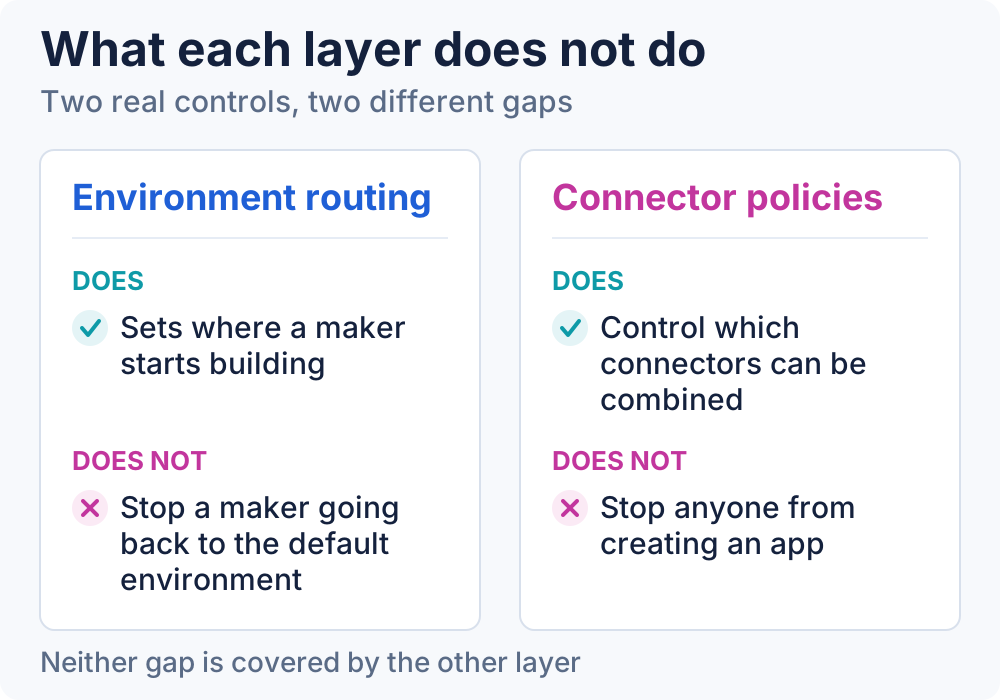 Two real controls with two real gaps. The gaps do not overlap, which is exactly why you need both.
And the hundreds of things already in there
Neither layer touches what already exists. That is a separate job, and the failure mode is trying to do it in one weekend.
Start by inventorying, not moving. For each app and flow in the default environment you want to know the owner, the connectors it uses, its dependencies, how widely it is shared, and whether the business would notice if it stopped. The admin center Actions page surfaces unused and ownerless resources, and the CoE Starter Kit gives you the connector and usage reporting to go with it.
Then sort by what the asset actually is. Microsoft Learn suggests a decision along these lines: a small app with a handful of users and no confidential data can reasonably stay; something used by a wider group or touching confidential data belongs in a shared environment; a widely used or highly sensitive app belongs in a dedicated one. Anything that needs proper application lifecycle management has to leave regardless, because the default environment was never meant to carry it.
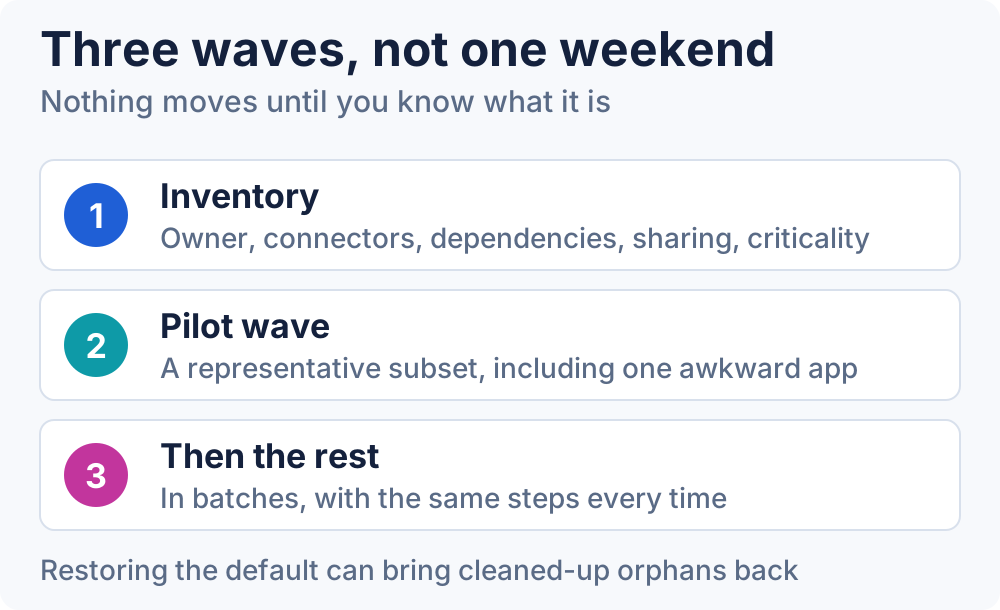 The pilot wave exists to find the surprises while they are still cheap.
Then pilot with a representative subset — not the easiest apps, a representative one, including at least one that will be awkward. The move itself is a solution export and import, plus security roles, plus configuration and data, plus testing, plus telling the users. Only after that do you move the rest, in waves. One caution from the documentation that catches people out: restoring the default environment later can bring back the orphaned apps and flows you cleaned up, so treat cleanup as a step you do not want to undo.
Two layers, one baseline
Routing shapes where new work begins. Connector policies shape what data new work can touch. Together they give you a governed starting point for everything created from now on, which is a genuinely different tenant than the one you had.
Neither of them closes the default environment. It stays open, every user in the tenant is still a maker in it, and the only thing that actually reduces your exposure there is moving the important things out. Assuming otherwise is the most expensive mistake in this whole area — because it feels like the work is done, right up until the day you find out it is not.
💬 Comments & Suggestions
Share your thoughts, tips, or drop a useful link below.