

Did you know that you can give your makers most of the Copilot Agent Kit without giving anyone a single row of your agent inventory?
 Two halves, one solution. Most organizations only ever switch on the left one.
A while ago I wrote about how the kit fills the governance gap your admin center can’t. That article was about the admin half — inventory, compliance, conversation quality, the things a Center of Excellence needs to sleep at night. This one is about the other half, the one almost nobody switches on: the components built for the people actually creating agents.
One naming note before anything else, because it will save you a search. The kit has been renamed from Copilot Studio Kit to Copilot Agent Kit. Microsoft Learn now describes it as a toolkit maintained by the Power Customer Advisory Team, and the case study spells the change out as “Copilot Agent Kit (formerly known as Copilot Studio Kit)”. The rebrand comes with an expanded scope, reaching into Microsoft 365 Copilot, Microsoft Agent 365, and Microsoft Foundry.
In practice, both names are live at the same time, and you need to search for both. The GitHub repository is still Power-CAT-Copilot-Studio-Kit, the managed solution file is still CopilotStudioKit_managed.zip, the app you open in Power Apps is still called Power CAT Copilot Studio Kit, and parts of the Learn table of contents still carry the old name. Nothing is broken — the documentation is just mid-migration.
What your makers actually get
The productivity side of the kit is not a token gesture. It is seven components, and each one solves a problem you have probably already tried to solve with a wiki page.
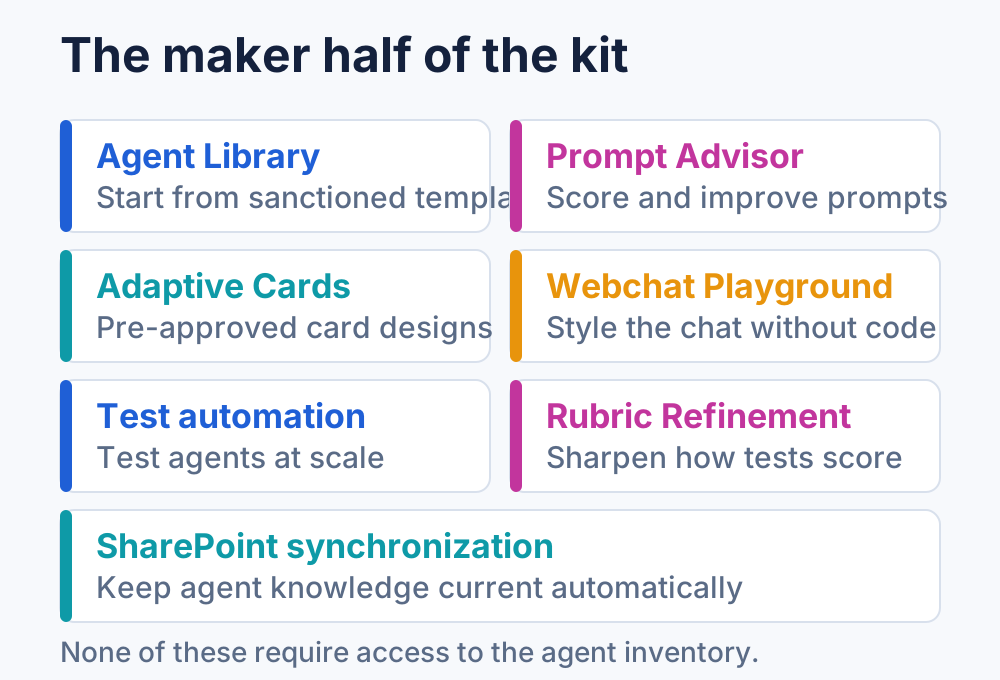 Every one of these exists because a maker was otherwise going to improvise it.
- Agent Library — reusable building blocks and templates, so a new agent starts from something sanctioned instead of an empty canvas.
- Prompt Advisor — makers submit a prompt and get back a confidence score, a detailed analysis, and suggested optimized prompts. This is your answer to uneven quality when several teams build in parallel.
- Adaptive Cards Gallery — pre-approved card templates, which keeps makers inside the visual and behavioral standard you already signed off on.
- Webchat Playground — customize the appearance and behavior of the agent web chat, including colors, fonts, and thumbnails, without hand-editing the embed code.
- Test automation — run agents against test sets at scale instead of one manual conversation at a time.
- Rubric Refinement — improve the rubrics those tests score against, so your evaluation gets sharper rather than just louder.
- SharePoint synchronization — keep SharePoint content flowing into agent knowledge automatically.
Two of these consume AI credits, so budget for it: a Generative Answers test costs roughly 50 credits, and Prompt Advisor costs roughly 120 credits per iteration. That is not a reason to skip them, but it is a reason to know before a maker discovers it for you.
The real objection: “I am not opening the inventory to makers”
This is the objection I hear every single time, and it is a reasonable one. A tenant-wide list of every agent, every owner, and every compliance flag is not something you hand out because someone wants nicer cards.
You do not have to. The maker components work completely independently of Agent Inventory.
The kit ships two security roles, and the separation between them is deliberate and sharp:
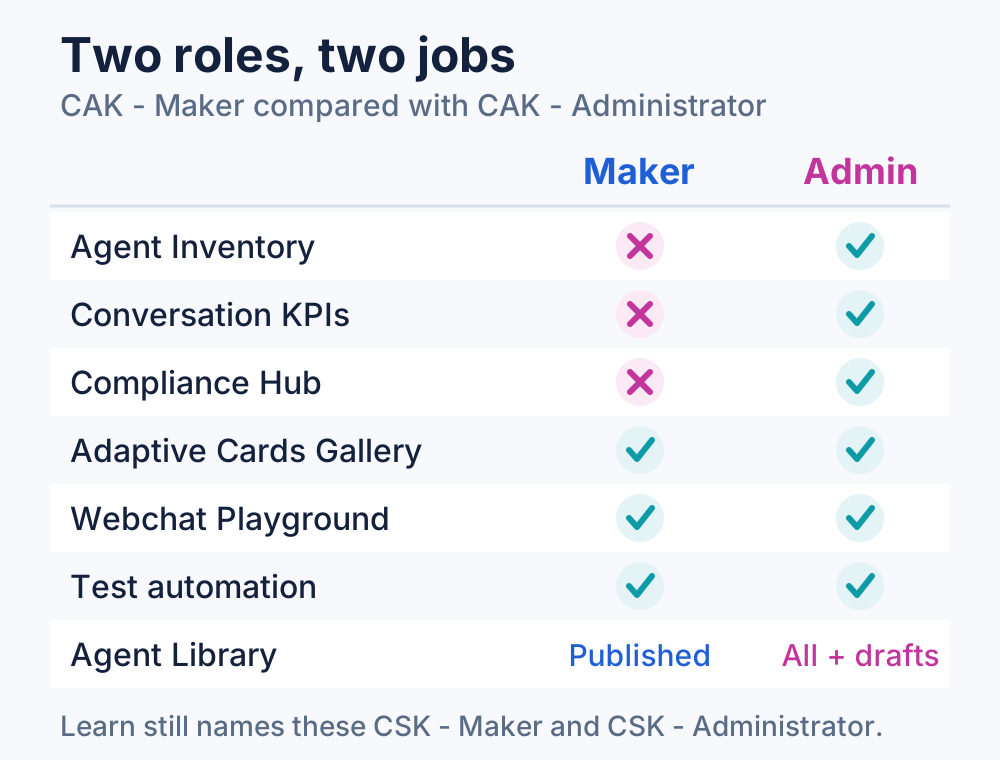 The maker role is not a watered-down admin role. It is a different job description.
- CAK - Administrator has organization-level access to most tables — the full administrative view across the environment.
- CAK - Maker is described as limited access for users who create and test agents, typically working with their own records while holding read access to shared configuration data.
Concretely, the maker role has no access at all to Agent Inventory, Conversation KPI, Agent Compliance, Conversation Analyzer, or Agent Value Summary. At the same time it gets full create, read, update, and delete on the tables behind the Webchat Playground and the Adaptive Cards Gallery, plus the test automation capability. Records like agent configurations, agent reviews, and test results are scoped to the owner, so a maker sees their own work and not their colleague’s.
There is one detail worth correcting, because it is widely assumed and it is wrong. The Agent Library is not scoped to “agents I created or that were shared with me.” Its visibility is based on publish status: an administrator sees all custom templates including drafts, while a maker sees published templates only, read-only. Creating, editing, and deleting custom templates stays with the admin role. That is arguably better for your purposes — makers consume a curated catalog and cannot quietly publish their own — but it is a different mechanism than row-level sharing, and it changes how you plan your rollout.
Two more things to check before you assign anything:
- The role names are inconsistent across sources. The GitHub documentation uses
CAK - AdministratorandCAK - Maker, while the Learn page on configuring users and teams still usesCSK - AdministratorandCSK - Maker. Same roles, mid-rename. Search for both. - There are deprecated roles still sitting in the solution — an old Administrator, Configurator, and Tester/KPI Viewer, all suffixed with
Deprecated. If anyone in your tenant still holds one, migrate them rather than layering a new role on top.
Assign through Entra ID security group teams rather than per user. It is the documented recommendation, and it means the maker population is managed where the rest of your access already lives. If you have secured columns in play, such as the Direct Line channel secret, the kit also ships a column security profile for exactly that.
The practical conclusion: give makers the library, the prompt advisor, and the cards. Keep the inventory with the admin group. Widen later if it earns it.
Three organizations already doing this
The published case studies are useful precisely because they land in different places on the admin-to-maker spectrum.
Nationwide sits closest to governance. As their use of Copilot Studio expanded, Agent Inventory in the kit is what let them maintain visibility and control while the number of agents grew. This is the classic reason people install the kit in the first place.
Business France is the opposite end, and the most interesting one for this argument. Their documented win is the Webchat Playground, which took them from concept to production while reducing the effort needed to embed the agent. That is a purely maker-facing component delivering a purely maker-facing outcome.
The City of Montréal shows the two halves feeding each other. They serve 1.7 million residents, with a website agent sitting on top of more than 40,000 pages of content. They use Conversation KPIs to identify where conversations go off track or fall back to generative answers, and to detect missing or poorly structured content. That is analytics from the admin half directly changing how makers design topics and where they invest their next hour.
Where to start
Do not stage a big bang. The kit is large, and trying to switch everything on at once is how it ends up half-configured and abandoned.
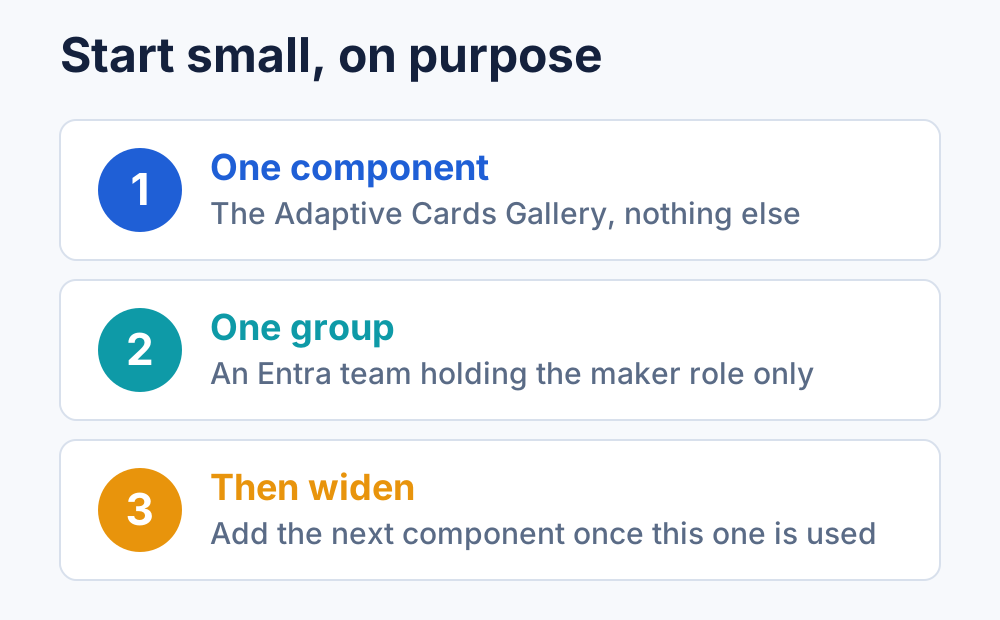 Each step should survive a month of real use before you take the next one.
Get the prerequisites straight first: a Dataverse environment, system administrator rights, and the Creator Kit deployed before the Agent Kit. You also need Power Apps component framework enabled for canvas apps and Code Apps enabled, licensing that covers model-driven apps and premium-connector flows, and a DLP policy that permits the connectors the solution ships with.
Then install from the marketplace or from the GitHub release, and let the Setup Wizard handle the connection references, environment variables, and flows. If you enable flows by hand instead, the documented order matters: grandchild flows first, then child, then the rest.
For the first real step, resist the urge to configure everything. Pick one maker component — the Adaptive Cards Gallery is the lowest-risk choice, because the blast radius of a bad card is a bad card. Create one Entra security group team, assign it the maker role only, and leave every inventory and analytics sync switched off. Publish two or three templates so there is something sanctioned to start from, and see what your makers do with it.
If you want help along the way, Power CAT runs public office hours every other week, in a US and an APAC slot, and the sessions are recorded.
Governance and productivity are the same kit
The reason this half goes unused is a framing problem. The kit arrives through a governance conversation, gets installed by an admin team, and inherits that team’s mental model — a monitoring tool, something you look at rather than something you build with.
But the components your makers need were shipped in the same solution, they run on the same Dataverse environment you already provisioned, and they are gated by a role that deliberately cannot see your inventory. You already paid the setup cost. The only thing standing between your makers and the other half of the kit is a security role assignment.
💬 Comments & Suggestions
Share your thoughts, tips, or drop a useful link below.