

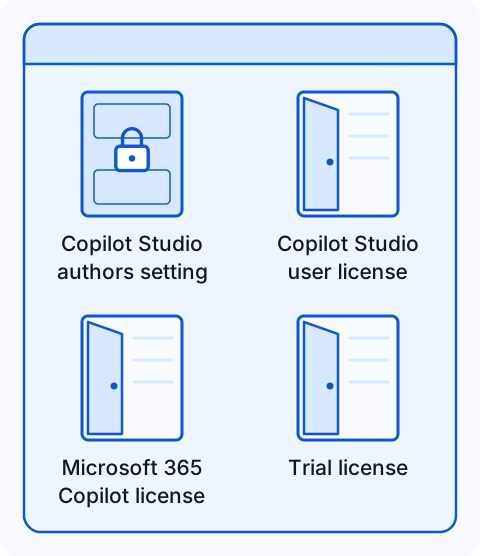
Assigning a security group to the Copilot Studio authors setting doesn't make it a complete access boundary. The setting grants author access in applicable pay-as-you-go scenarios. As Microsoft Learn explains, it "doesn't automatically revoke access that a user receives through another license, role, or permission."
What the authors setting grants
Copilot Studio access persists outside the authors security group describes the symptom: "users outside the group might still be able to open Copilot Studio or perform some authoring actions." Licenses determine product entitlement. Environment security groups control access to an environment, and Dataverse security roles determine which actions users can perform there.
The pay-as-you-go FAQ in Manage Copilot Credits and capacity for Copilot Studio asks: "If I use the pay-as-you-go plan, can I grant my users access to Copilot Studio?" Its answer is: "Assign a security group, and only members of that group have access to Copilot Studio." This covers pay-as-you-go access. Selecting that group doesn't revoke licenses or permissions a user already has.
Four ways in
The four options in Licensing for agents powered by the standard harness are alternatives: you need "one of the following configurations". The authors setting is listed as a "role".
| Way in | What it gives | What closes it | What it leaves open |
|---|---|---|---|
| Copilot Studio user license | Use of Copilot Studio. It needs a tenant prepaid Copilot Credit pack subscription first. | The user has no Copilot Studio per-user license. | The GitHub Copilot harness experience, covered below. |
| Authors setting | Author access for the selected group in pay-as-you-go scenarios. | The user is outside the assigned group. | Access from any other license, role or permission. |
| Microsoft 365 Copilot license | It "lets you use Copilot Studio to build agents for the GitHub Copilot harness." | The user has no Microsoft 365 Copilot license that provides access. | The actions available to a user with only this license still need to be checked in each harness. |
| Trial license | Creating agents and testing them in the test chat panel, but "you can't publish the agent." | The user has no trial license. | Self-service sign-up, which needs a separate review. |
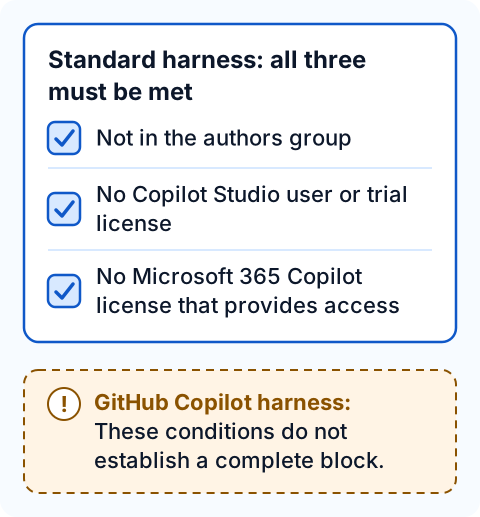
The conditions that close each path come from the access guidance, which applies them to "the standard Copilot Studio experience". To block access, "all the following conditions must be met", and "Removing only one service plan or license might not block access if another applicable entitlement remains." Check every applicable entitlement, including those managed in another product or by another team.
The GitHub Copilot harness is different
For the GitHub Copilot harness, the access guidance states: "These conditions don't establish a complete access block for agents powered by the GitHub Copilot harness." In particular: "You don't need an individually assigned Copilot Studio user license to enter the experience powered by the GitHub Copilot harness. Removing that license doesn't, by itself, prevent someone from entering the experience."
For portal access, Microsoft Learn warns: "Don't treat the Copilot Studio authors setting as a guaranteed complete portal-access block for the GitHub Copilot harness." The four configurations in the licensing guidance apply to the standard harness, not to the GitHub Copilot harness.
Four actions, four controls
Microsoft Learn treats four actions separately: "Opening Copilot Studio, creating or saving an agent, editing an existing agent, and publishing an agent are separate actions. A control that blocks one action might not block the others." Use its "Action to restrict" table to match each action with the relevant control.
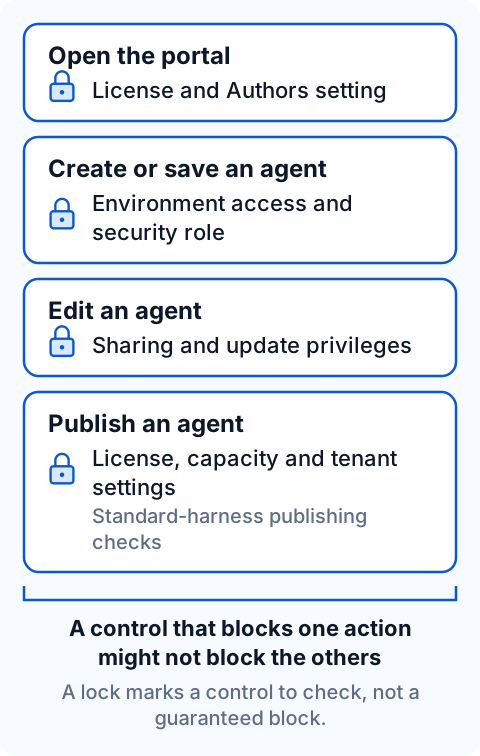
Environment access and Dataverse privileges are separate requirements: "A user must have access to the environment and the required table privileges to create or modify agents." Work with Power Platform environments in Copilot Studio confirms the environment requirement: "To create an agent in an environment, you need access to the environment." For authoring, Secure your Copilot Studio projects recommends: "Assign the Environment Maker role to users who need to author agents."
| Control | What it restricts | What it doesn't block |
|---|---|---|
| Environment security group | Access to a selected environment. | "Opening Copilot Studio or accessing another environment." The restriction doesn't apply to every administrator account. |
| Environment Maker and other authoring roles | Agent creation and draft saves in that environment. | "The user might still open the portal or begin configuring an agent." |
| Agent sharing and update privileges | Edits to an existing agent. | "Removing one sharing grant doesn't remove permissions supplied by another role." |
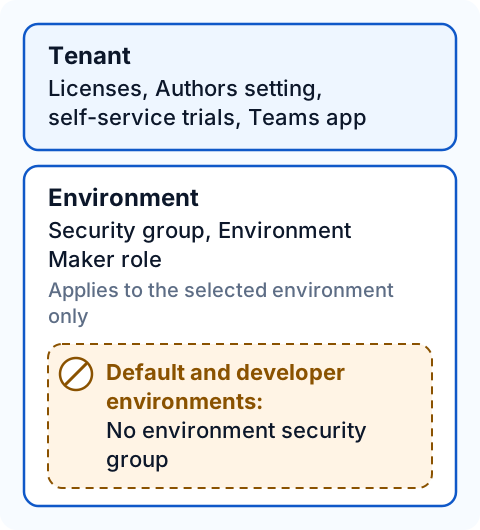
Security groups have a scope limit: "You can't assign an environment security group to the default environment or to developer environments." Environment-level controls also apply only to the selected environment, so they "don't establish a tenant-wide portal-access block or restrict authoring in other environments that a user can access."
Publishing has its own requirements: "Publishing agents can have additional permission and licensing requirements." For standard-harness agents, check licenses, capacity and tenant settings. Microsoft Learn warns: "Don't apply standard-harness license checks as a publishing restriction for the GitHub Copilot harness."
Permissions and credit controls
Manage costs for agents powered by the GitHub Copilot harness explains: "The GitHub Copilot harness doesn't have its own maker-access setting. To control who can create agents, use your existing Copilot Studio and environment permissions." Selecting an authors group doesn't revoke existing access: "Choosing a group in the Copilot Studio authors setting doesn't automatically remove access from users outside that group. Review existing access separately."
Keep permissions and spending separate: "Credit allocations and agent limits control consumption. They don't control who is an approved author or who can open the Copilot Studio portal." Both controls are needed: "Maker permissions and spending controls do different jobs, so you need both."
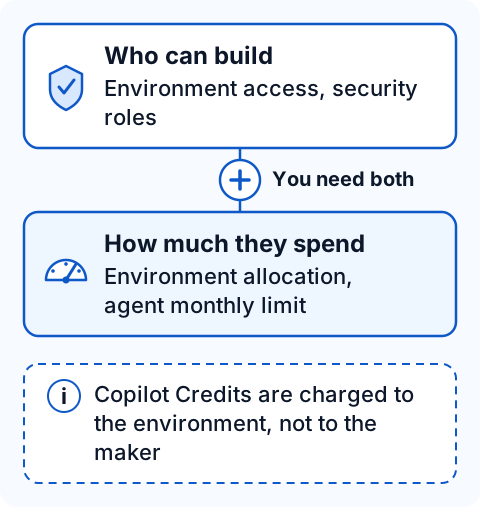
For the GitHub Copilot harness, "Creation and runtime activities consume Copilot Credits regardless of the user's license." Credits are "charged to the environment where the agent runs" and "not to the individual makers or users who run agents." A license may give someone access, but credit consumption is charged to the environment.
Controls by level, and trials
Implement a zoned governance strategy lists maker access controls at three levels: tenant (licenses, Copilot Author settings, self-service trials, the Teams app), environment (security groups, security roles) and agent (sharing for authoring). For the GitHub Copilot harness, confirm the scope of each tenant control before relying on it.
Assign licenses and manage access to Copilot Studio says users can try Copilot Studio for a limited time, and you can turn trial sign-up on or off "by modifying the AllowAdHocSubscriptions flag in your organization settings." The Graph PowerShell example under "Block email-based sign-ups" in Block unauthorized self-service sign-ups and purchases sets allowedToSignUpEmailBasedSubscriptions to $true. Confirm the intended value for the restriction you want, and test the change in a test tenant before applying it to production.
Test with an account that is not an approved maker
Microsoft Learn recommends testing each restriction with a non-administrator account:
"Test each required restriction with an account that isn't an approved maker and doesn't have administrator privileges. Record portal entry, starting agent configuration, creating and saving a draft, editing an existing agent, and publishing as separate outcomes. Being able to open an authoring page or start configuring an agent doesn't confirm permission to save or publish it."
Repeat the test for each harness and in the default environment, where no environment security group can be assigned. Confirm the current authors setting and its location in the Power Platform admin center before making changes. The documentation refers to it as "Copilot Studio authors", "Copilot Author setting" and "Copilot Author".
These checks concern authoring. Users of published agents "don't need a special license", and "Guest users of your tenant can't access Copilot Studio." Classic agents in Teams are a separate case: after June 2026, the Copilot Studio for Teams app redirects makers to the Copilot Studio web app.
💬 Comments & Suggestions
Share your thoughts, tips, or drop a useful link below.