

 An agent’s model can change through more than a maker’s selection.
The model a maker selects is not necessarily the model an agent keeps running. An agent can follow an automatic default upgrade, fall back when its selected model is unavailable, or temporarily use a retired model through a per-agent setting.
Documentation checked: 19 October 2026.
The default moves, and the agent follows
Agents on the default move whenever Microsoft upgrades it (Manage the AI model lifecycle for Copilot Studio agents):
“An agent that uses the default model moves to a new model whenever the default is upgraded, whether or not you planned for it.”
Selecting Default means following Microsoft’s periodic default upgrades.
For high-risk and high-volume agents, select a specific model so each change goes through your migration process. This recommendation does not apply to every agent.
Even a specific selection has a fallback (Select a primary AI model for your agent):
“Agents also use the default model as a fallback if a selected model is turned off or unavailable.”
The conditions that turn a model off or make it unavailable are not documented. Selecting one does not guarantee that it serves every invocation.
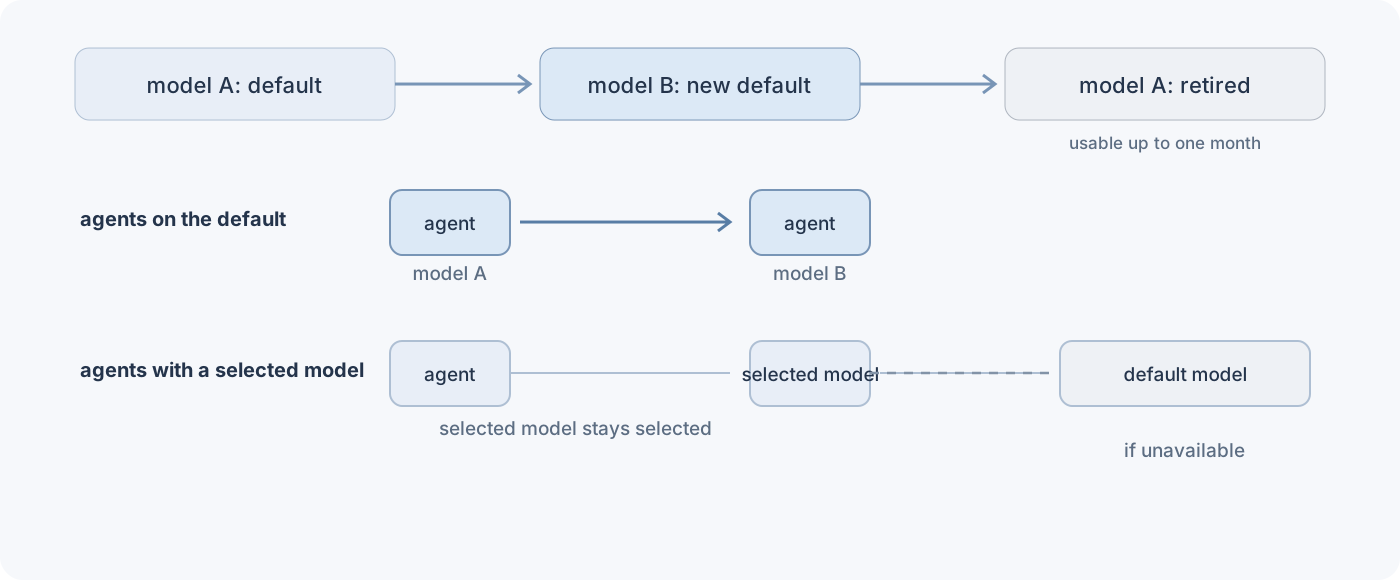 Agents following the default move with it. A selected model has a documented fallback if it is unavailable.
The old default becomes retired
When model B replaces model A as the default, model A is retired and stays usable for up to one month.
The window lasts 30 days after an automatic upgrade (Continue using a retired AI model).
The model selector is on the agent’s Overview page, under Model. On Settings > Model, turn on Continue using retired models.
With Continue using retired models enabled:
“Once Continue using retired models is turned on, you can switch between retired and upgraded models at any time during the 30-day period. Your preference applies to any future model upgrades until you turn off the setting.”
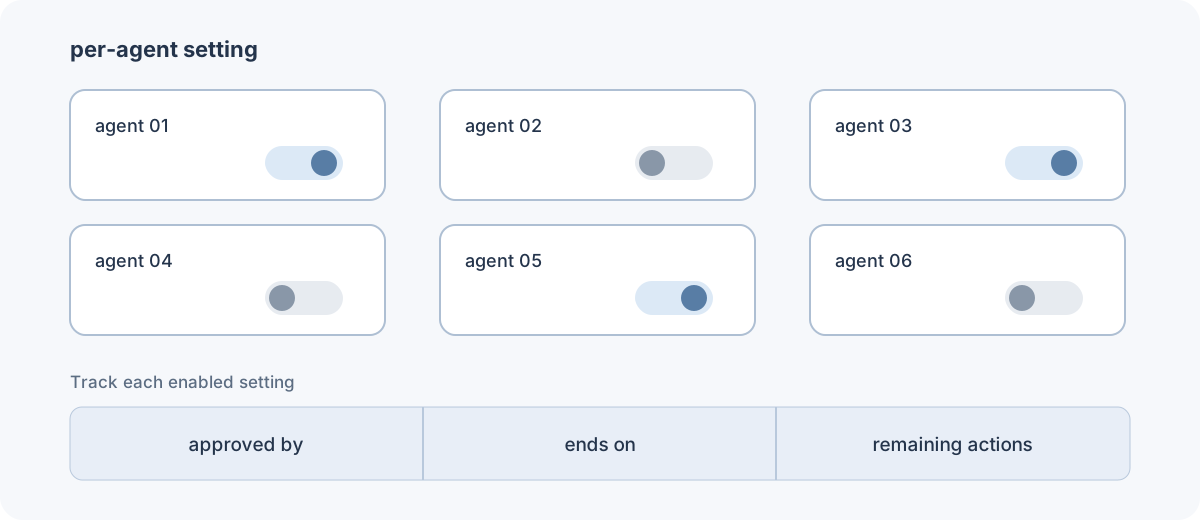 The setting and its tracking are per agent, not a single tenant-wide switch.
Configure the setting on each agent. Track which agents use it, who approved it, when it expires and what remains to be done (Decide when to upgrade an AI model for Copilot Studio agents).
The window gives you time to complete evaluation and migration, not a long-term way to keep the old model. What happens to an agent when the 30 days end is not documented.
The October 2025 entry in What’s new in Copilot Studio announced GPT-4o retirement between October 27 and 31, 2025 for agents using generative orchestration, except GCC customers. It named GPT-4.1 as the new default and said GPT-4o remained available until November 26, 2025 with Continue using retired models turned on.
On 19 October 2026, GPT Chat Latest is tagged Default in every region column, and GPT-4.1 is tagged GA. For US Government clouds, GPT-4o is Default for GCC, GCC High and DoD. The date of the later default change and its effect on individual agents are not established by these sources.
The same agent can behave differently
An agent can behave completely differently with another model, even within the same family. A newer model may follow instructions more literally, choose different tools, or change response length, formatting and latency. Workarounds added for the previous model’s limitations can make results worse.
The most common upgrade mistake is a use category mismatch. Moving a high-volume FAQ agent from a general to a deep model because it scores better may improve quality only marginally while latency and credit consumption rise sharply.
Five ways to look, with different limits
The admin center shows configured models and consumption. The CLI, inventory API and telemetry have different uses and limits:
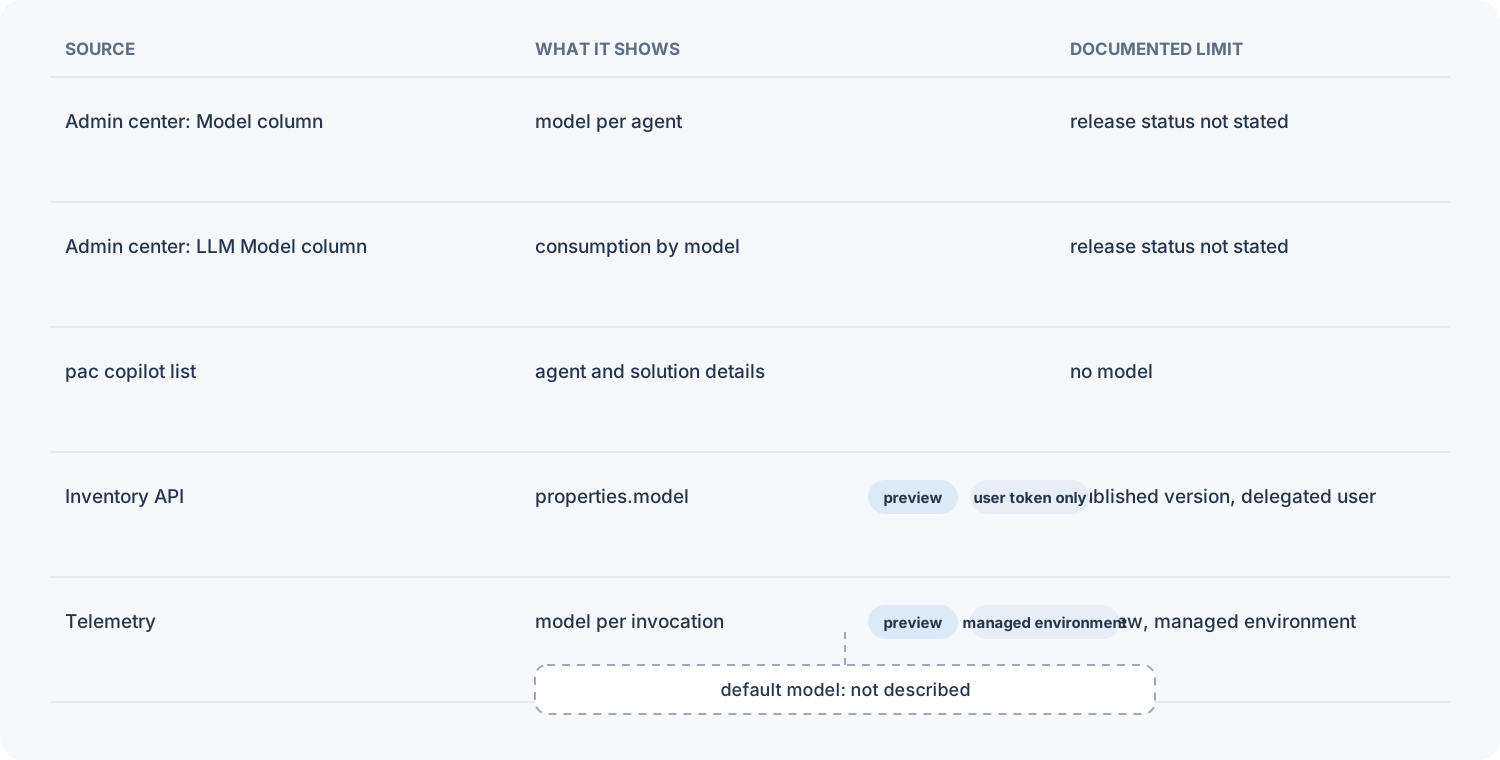 The views report different things. A configured model is not the same as the model used for each invocation.
| Where to look | What it shows | What it does not establish | Documented limit |
|---|---|---|---|
| Power Platform admin center: Manage > Copilot Studio > Model | Configured model across agents; filter or export | Model used per invocation | Release status not stated |
| Power Platform admin center: Licensing > Copilot Studio > Environment > Message consumption details > LLM Model | Consumption by model in one environment | Tenant-wide configured models | Environment-scoped; release status not stated |
Power Platform CLI: pac copilot list --environment <environment-id-or-url> |
Agent name, Copilot ID, component state, managed status, solution ID, status code and state code | Model | Output omits model |
| inventory API | Agent name, display name, environment, configured model | Default agent’s properties.model value |
properties.model is Preview; delegated user only; published agents, no V1 |
| Environment-level telemetry with Application Insights (preview) | Model per invocation in OpenTelemetry GenAI spans | Tenant-wide configured-model inventory | Preview; managed environments only |
The API needs a user’s token
Send a POST request to:
https://api.powerplatform.com/resourcequery/resources/query?api-version=2024-10-01
Filter on resource type microsoft.copilotstudio/agents and project properties.model. The response returns that field as properties_model.
You need a Power Platform administrator or Dynamics 365 administrator account, an access token for https://api.powerplatform.com/, and agent inventory enabled. If results are truncated, pass the returned skipToken in Options.SkipToken to retrieve the next page.
The Power Platform inventory API supports delegated user authentication only. App-only service principal or managed identity requests return HTTP 403 Forbidden.
A scheduled run still needs a signed-in user’s token. How to schedule the query under a delegated identity is not documented.
The default is the inventory blind spot
The properties.model field holds the AI model used by the agent, with gpt-4o as an example. It is Preview; properties.harness is generally available (Microsoft Copilot Studio Agent inventory).
The inventory reflects the published version of an agent. A newer draft does not appear until publication, and agents created with V1 of Copilot Studio are excluded.
The example count by model in the lifecycle guidance excludes agents using the Copilot Studio default or running in the Microsoft Copilot experience. What the inventory model field contains for an agent on the default is not documented. That leaves a gap precisely where models change without a maker requesting it.
Record the choice, not just the model name
Add the model to the inventory described in Your Copilot Studio agent starts billing before you publish, alongside the harness, agent name and owner.
For each agent, record:
- Agent identity, environment, business criticality and owners.
- Configured model and release tag, marking default versus specifically selected.
- Standard harness or GitHub Copilot harness.
- Test set location and last baseline date.
- Retired-model setting, expiry and approver.
The baseline must exist before the change
Capture the baseline before changing models (Run and validate an AI model migration for Copilot Studio agents):
“Run the test set against the current production model to establish the baseline. Do this while the current model is still in place, because after the model changes the baseline can’t be reconstructed.”
Start planning before a retirement announcement.
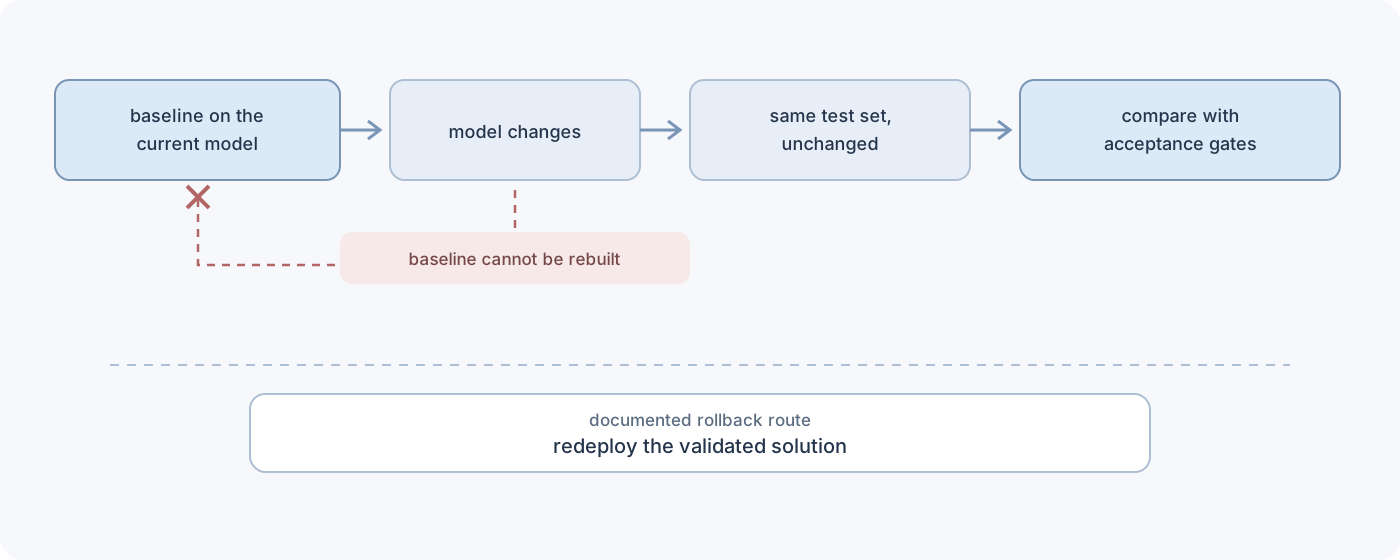 Capture the baseline first. The documented rollback route is separate from the temporary retired-model setting.
Keep the results from the current model, rerun the same test set unchanged against the candidate, and compare the results with your acceptance gates.
Record latency and Copilot Credit consumption separately because evaluations do not report them. Export evaluation results to CSV to keep them beyond the 89-day retention period.
The retired-model setting lets you switch models during the 30 days after an automatic upgrade. Migration rollback follows a separate route:
“The rollback path for a model change is redeploying the previously validated solution version, which is slower than a configuration toggle.”
How these mechanisms relate is not documented. One is a temporary switch; the other requires redeployment. Do not assume that redeployment makes an expired or unavailable model usable again.
Record the harness before applying the rule
The harness is the runtime between what you build and the model. It controls model calls, context, responses and tools (Harnesses in Copilot Studio).
Model selection and the retired-model window are documented for the standard harness.
The Default and Retired definitions are the same for the GitHub Copilot harness, but its availability table shows no model tagged Default on 19 October 2026 (Model availability and controls (GitHub Copilot)).
The retired-model window is not documented for agents on the GitHub Copilot harness. That does not establish whether it exists there.
Record whether each agent follows the default or uses a selected model. Capture its baseline while the current model is still in place, and keep the unanswered questions separate from documented behaviour.
💬 Comments & Suggestions
Share your thoughts, tips, or drop a useful link below.