

“The flow is owned by a service principal and deployed by a pipeline, so licensing is handled.”
The Microsoft Learn pages say otherwise. A premium cloud flow owned by a service principal application user needs a license to run and stay compliant, and a flow without one can be suspended. The license is not part of what a pipeline deploys. It is a step you repeat in every target environment, and one of the two main routes ties the flow to a person again, which is what the service principal was meant to remove.
 The pipeline moves the flow. The license is assigned again in the target.
What the rule says
Assign a user license to a flow owned by a service principal states the rule:
A cloud flow owned by a service principal application user that uses premium features needs a license to run and stay compliant. Instead of assigning a capacity license to the flow, you can designate a licensed user. The flow then runs under that user’s Power Automate entitlement.
The license cannot go on the service principal: “A service principal application user is a non-interactive user, so a license is never assigned to the service principal directly.” The same page states the risk:
If a service principal owned flow that uses premium features isn’t licensed, it can be suspended for noncompliance with the message: This flow was suspended because flows owned by service principals are not compliant.
The routes to a license
Support for service principal owned flows lists three options for a premium flow: a Power Automate Process or per-flow license on the flow, membership in a flow group that has a Process license, or a designated licensed user. A flow that doesn’t use premium connectors, or is used only in the context of a Dynamics 365 application, is exempt from the Process or per-flow license need. The Power Automate licensing FAQ adds that the per-flow plan was removed from the price list on 1 February 2024: existing per-flow licenses keep working, but you can’t buy more, stack them or share them across a flow group.
That leaves two main routes: a Process license and a designated licensed user.
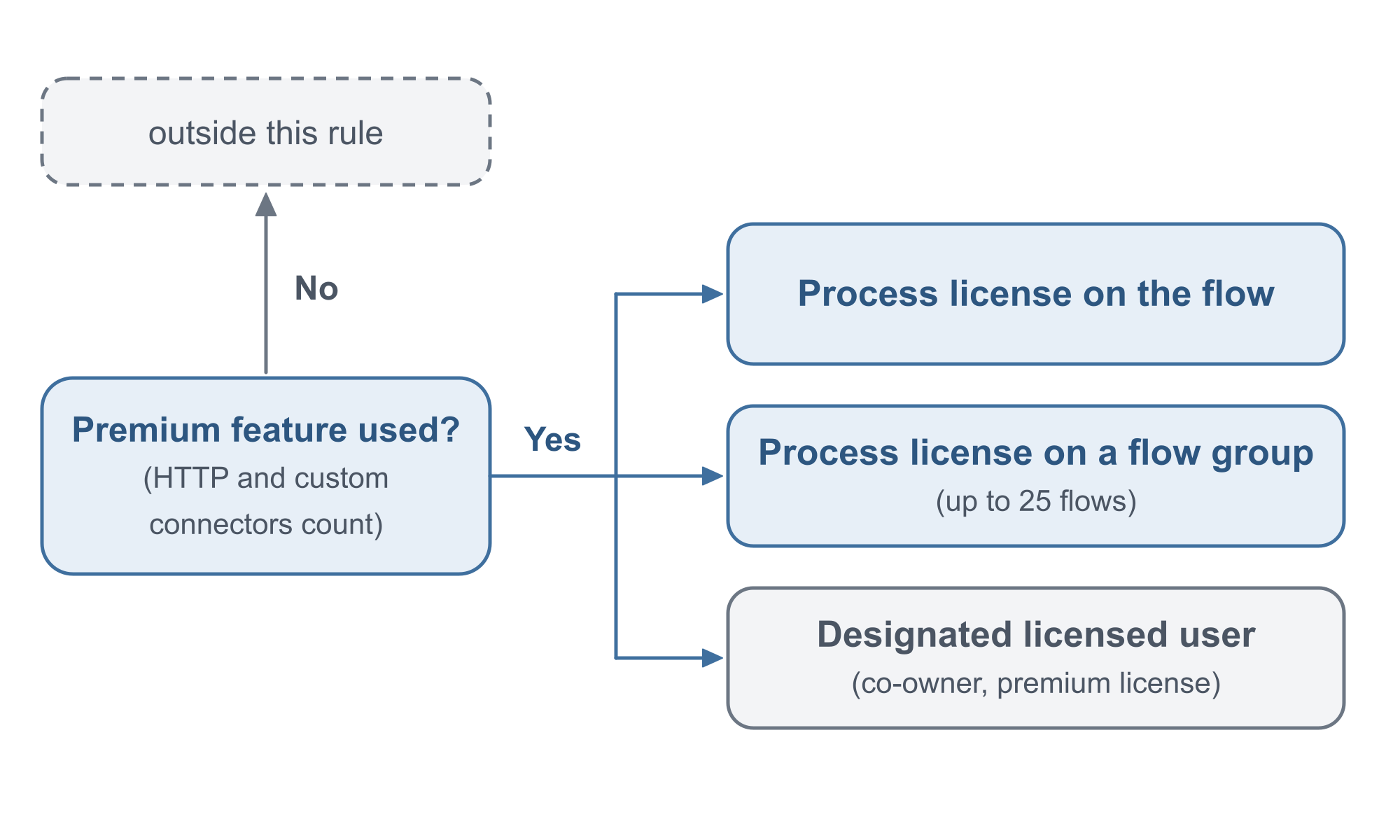 Premium use decides whether the rule applies.
How the two routes compare
A Process license on the flow “entitles it to 250,000 actions per day independent of any user”, and the flow must be solution-aware. A flow group lets up to 25 solution-aware cloud flows share one license, and the FAQ is explicit about membership: “You must explicitly add every parent and child flow that should use the group’s capacity.” It adds that “adding a parent flow doesn’t automatically add or license its child flows”.
The designated user “must be a co-owner of the flow” and “must hold a license sufficient to operate the flow.” Sufficient means:
The license must cover every premium feature the flow uses, such as premium connectors, custom connectors, or HTTP actions. A Power Automate Premium license covers these features. A Microsoft 365 seeded license doesn’t, and the flow stays noncompliant if you designate a user who only has one.
HTTP actions and custom connectors count as premium. That is the condition readers miss: a co-owner with a Microsoft 365 license only looks licensed.
| Process license | Designated licensed user | |
|---|---|---|
| What is licensed | The flow, or a flow group of up to 25 flows | The flow, under a person’s entitlement |
| Who it depends on | No user | A co-owner whose license covers every premium feature |
| What can break it | A flow missing from the group | The user losing the license or the co-ownership |
The designation brings a person back
The assign page says that using a service principal to own flows “removes the dependency on an individual flow owner”. The designation route puts a person back in the chain:
If the designated user later loses their Power Automate license or is removed as a co-owner, the flow can fall out of compliance and be suspended.
That is my reading, not the page’s: the service principal was chosen to remove the dependency on an individual owner, and the designation gives part of that dependency back.
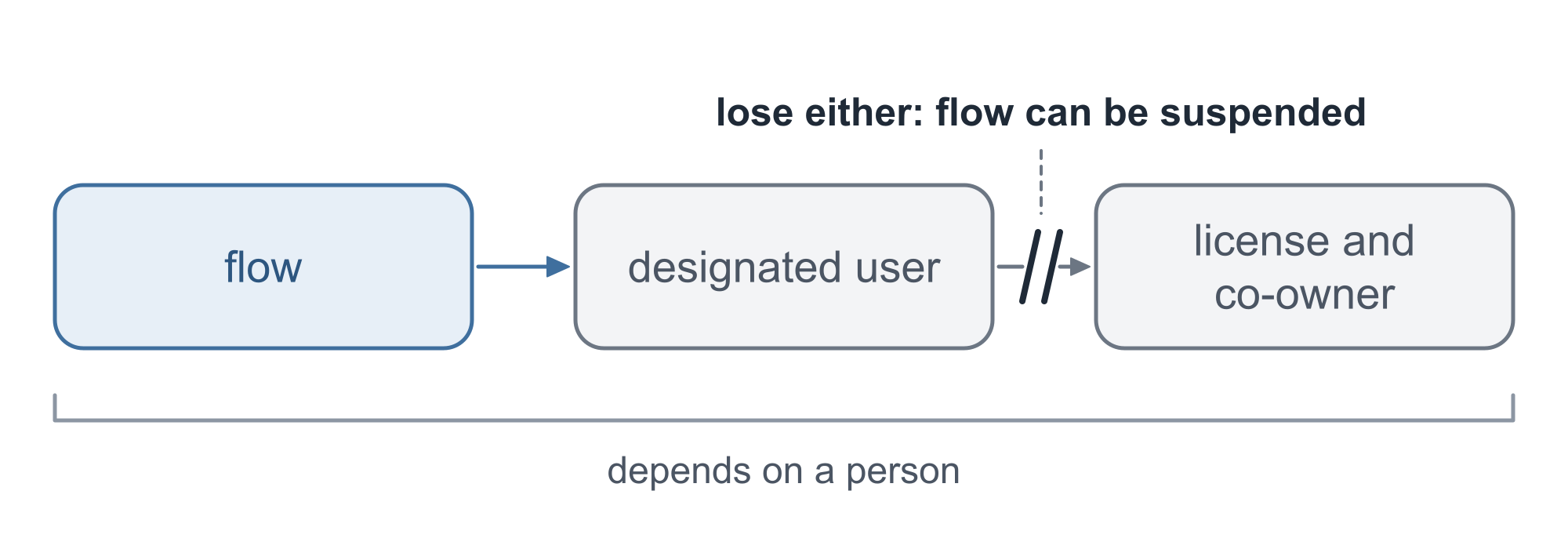 Lose either, and the flow can be suspended.
Neither route travels with the pipeline
The assign page covers deployment:
The user license designation points to a user record in a specific environment, so it isn’t carried in a solution. Deploying the flow through a managed solution or a pipeline doesn’t reapply it in the target environment.
The FAQ says the same about the Process route: “Process licenses are environment-specific.” Importing a flow into another environment creates a separate flow, and flow groups and Process capacity assignments are environment-specific too. For every target environment it says to “create or verify the flow group, explicitly add each parent and child flow that should share capacity, and assign a Process license to the group.”
Overview of pipelines in Power Platform says what pipelines do deploy: “Pipelines deploy solutions as well as configuration for the target environment such as connections, connection references, and environment variables.” Connections and environment variables are provided upfront, “without needing manual post-processing steps”. A license assignment is not on that list, and the page does not mention licensing flows. Reading that as a gap is an inference, not a limitation the page states.
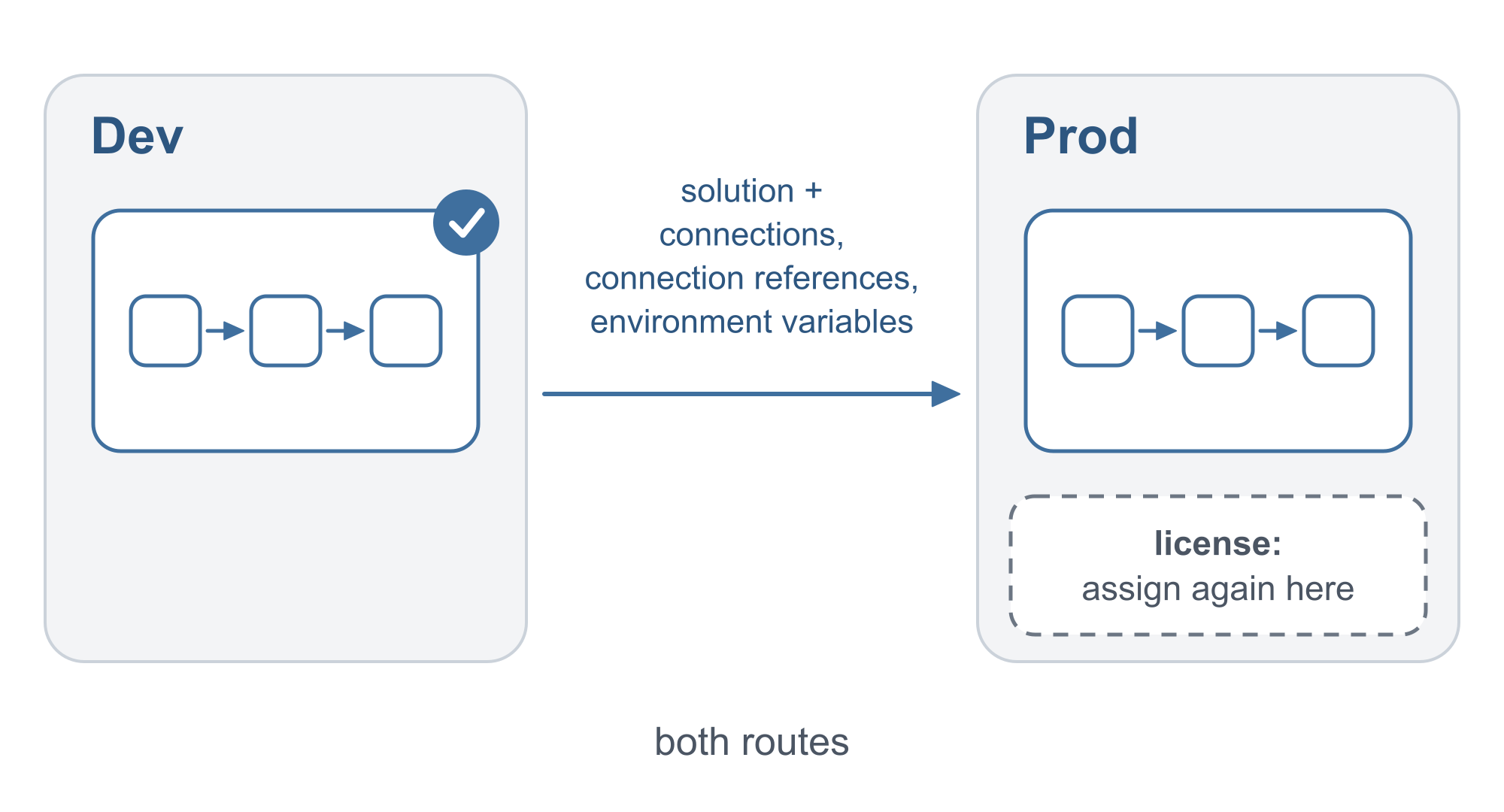 Both routes: assign the license again.
The check to add after every deployment
The assign page lists what to do after you deploy:
- Confirm the licensed user is a co-owner of the flow in the target environment.
- Confirm that user’s license covers the flow’s premium features in that tenant.
- Designate the license again on the flow’s Details page, or set the Licensee column. For a Process license, create or verify the flow group and assign the license.
- Confirm the flow is turned on.
The designation is stored in Dataverse as the Licensee column on the flow’s row in the Process (workflow) table: “The column is a lookup to a User (systemuser) record.” The page shows two ways to set it: the Update a row action of the Microsoft Dataverse connector on the Processes table, “such as a step in a deployment flow that runs after a solution import”, or a Web API request:
PATCH [Organization URI]/api/data/v9.2/workflows(<workflowId>) HTTP/1.1
Content-Type: application/json

{
  "licensee_systemuserid@odata.bind": "/systemusers(<systemUserId>)"
}
Pipelines have a trigger that could run this step. Extend pipelines in Power Platform lists OnDeploymentCompleted for the Is delegated deployment extension and says triggers are available in cloud flows “within the pipelines host environment”.
Connecting the two is an inference from two pages, and it is untested: an idea to try, not a documented feature. The idea is a cloud flow in the host environment that starts on OnDeploymentCompleted and updates the Licensee column. The pages don’t say whether it can update that column in the target environment, or with which connection, and the extend page warns that new extensions are “being gradually rolled out across regions and might not be available yet in your region”.
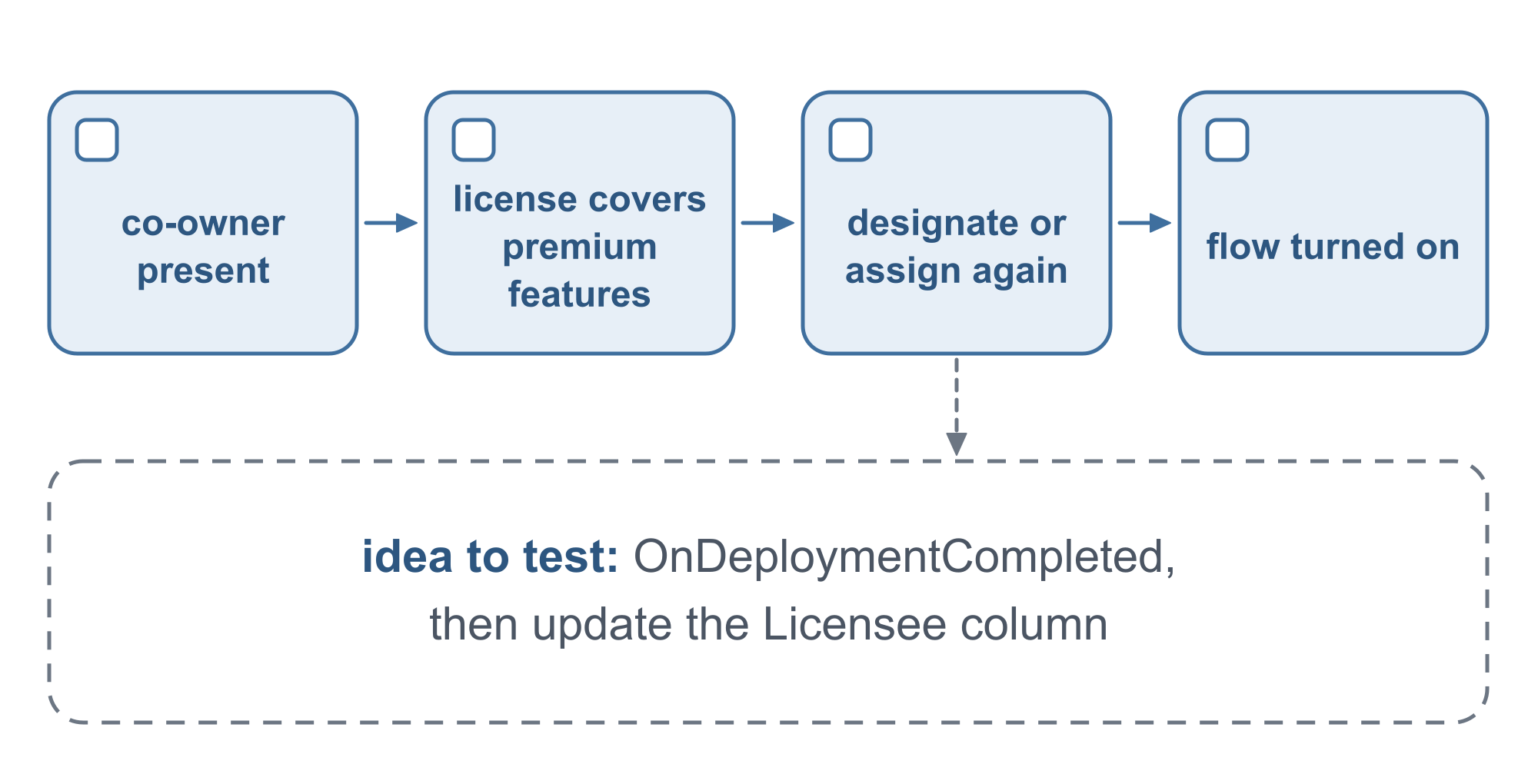 Four checks, and an idea to test.
Manual flows and the environment license
The rule moves when a person starts the flow. The FAQ says: “Automated and scheduled flows use the flow owner’s license context. Instant flows (button, Power Apps) use the invoking user’s license context.” For a service principal owner it adds: “Manual flows (button, Power Apps) use the invoking user’s action limits even when the owner is a service principal. The invoking user must have a Power Automate Premium license if the flow uses premium connectors.” A service principal owner does not settle a flow that someone starts by hand.
The pipelines overview covers a different license, the one for the environments, not the flows this article is about: licenses granting premium use rights are required for all managed environments, and starting in October 2026 the admin deployment page notifies admins when pipelines deploy to unmanaged target environments, with 30 days to approve managed environments before future deployments to the target are blocked.
Questions to ask before the first production deployment
- Does the flow use a premium feature? HTTP actions and custom connectors count.
- Which route: a Process license on the flow or on a flow group, or a designated licensed user?
- If a person is designated, who? A co-owner whose license covers every premium feature, and now part of the chain.
- What repeats in each environment? The designation or the Process assignment and flow group, and the check that the flow is turned on.
- What stays undocumented? None of the six pages answers these:
- Whether a designation made in the target environment survives a later upgrade of the solution. The assign page covers only the first deployment, and the pipelines overview says only that the default import behavior is Upgrade without Overwrite customizations.
- When and how a flow that arrives unlicensed is suspended. The page says only that it “can be suspended”.
- Whether a flow triggered by OnDeploymentCompleted, which runs in the pipelines host environment, can update the Licensee column in the target environment, and with which connection.
- Whether the issue disappears or moves to the licensing of that person when the pipeline stage owner is a user and not a service principal. Deploy pipelines as a service principal or pipeline owner says only that “the owner is the delegated service principal or pipeline stage owner”.
- Whether the pipelines extensions are available in your region.
💬 Comments & Suggestions
Share your thoughts, tips, or drop a useful link below.