

“We don’t open public endpoints.”
Security teams often apply this rule to every connector for Microsoft 365 Copilot. But the two connector models ask opposite things of the network. A rule that blocks one may not affect the other.
 The direction of the traffic is the problem, not the connector.
Synced stores a copy; federated does not
The FAQ in the Federated connectors overview answers in two sentences:
Synced Copilot connectors index data into Microsoft Graph. Federated Copilot connectors fetch content live; no indexing takes place.
A synced connector stores an indexed copy. A federated connector uses the Model Context Protocol (MCP) to fetch content from the source when the user asks a question. The overview puts it directly: “No data is indexed into Microsoft 365. Responses are fetched dynamically from the data source via MCP.” It describes access “in real time”, “while keeping the data in its original location”, under “the user’s identity and permissions”.
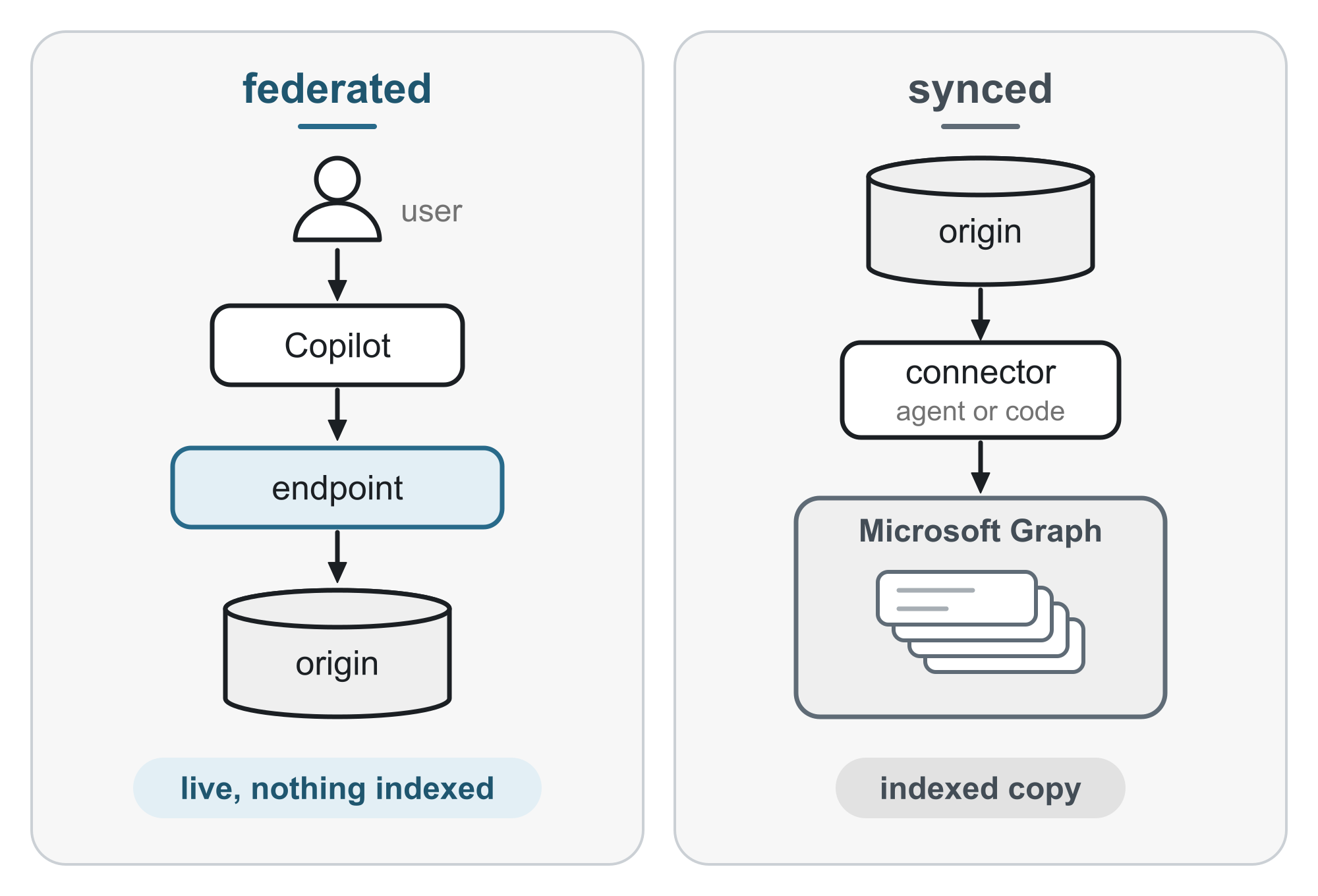 Federated keeps nothing and asks the source live. Synced keeps an indexed copy.
What each model asks of the network
Submit a federated Microsoft 365 Copilot connector states the network requirement for a federated connector:
After an admin approves it, Microsoft 365 Copilot connects to your remote MCP server through a public HTTPS endpoint and surfaces your content in Copilot experiences.
The page also lists “A reachable public HTTPS endpoint for your MCP server” as a prerequisite and describes the “MCP server URL” field as “Public HTTPS endpoint for your MCP server”. It is the connector submission page, so it is the source of the requirement, not a statement about every internal scenario. Debug MCP and API plugins locally confirms the same principle for declarative agent plugins: “Microsoft 365 Copilot must reach the MCP or API server over the internet.” That page covers plugins, not synced connectors.
For a synced connector using on-premises data, the direction reverses. The Microsoft Graph connector agent overview says the agent “enables secure data transfer between on-premises data and the Copilot connector APIs”. Its recommended configuration calls for “Network access to the data source and internet through port 443”. It also recommends allow-listing Microsoft domains if proxies or firewalls block unknown domains. That access starts inside your network. The page does not mention inbound rules.
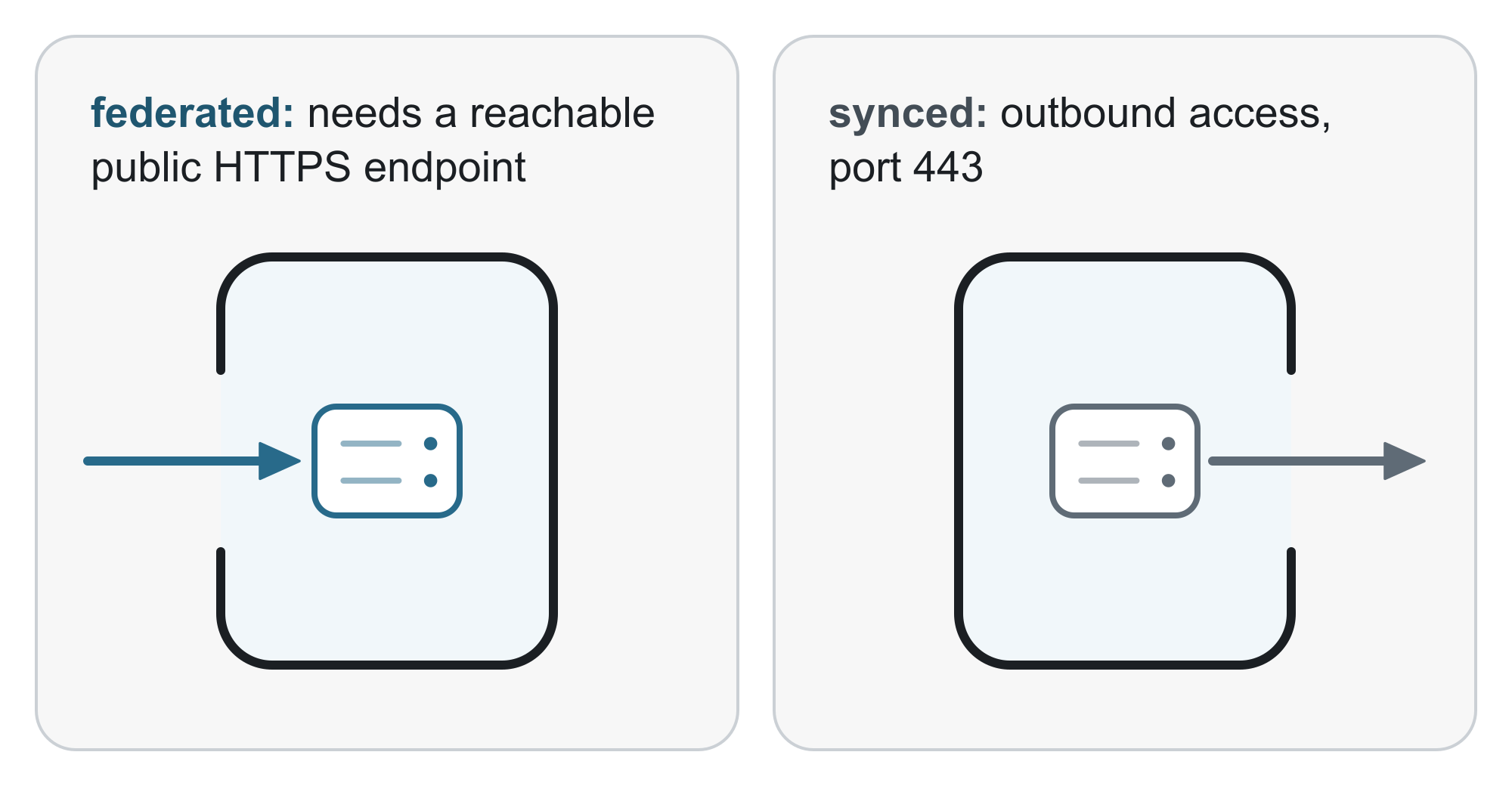 One model needs to be reached. The other reaches out.
Check licensing before the network design
Prerequisites for deploying connectors sets a condition no firewall rule can meet:
Federated Copilot connectors are available only to tenants and users with a Microsoft 365 Copilot add-on license (or Microsoft 365 E7). They aren’t supported with Copilot Studio licenses or Microsoft 365 Copilot pay-as-you-go.
The table lists synced connectors with Copilot grounding and agents for tenants with an add-on license or E7. With a Copilot Studio license or pay-as-you-go, it lists “Agents only (no Copilot grounding)”. A tenant with only Copilot Studio licenses cannot use federated connectors, so the endpoint question does not arise. Licensing comes before the choice between live data and an indexed copy, and before the network design.
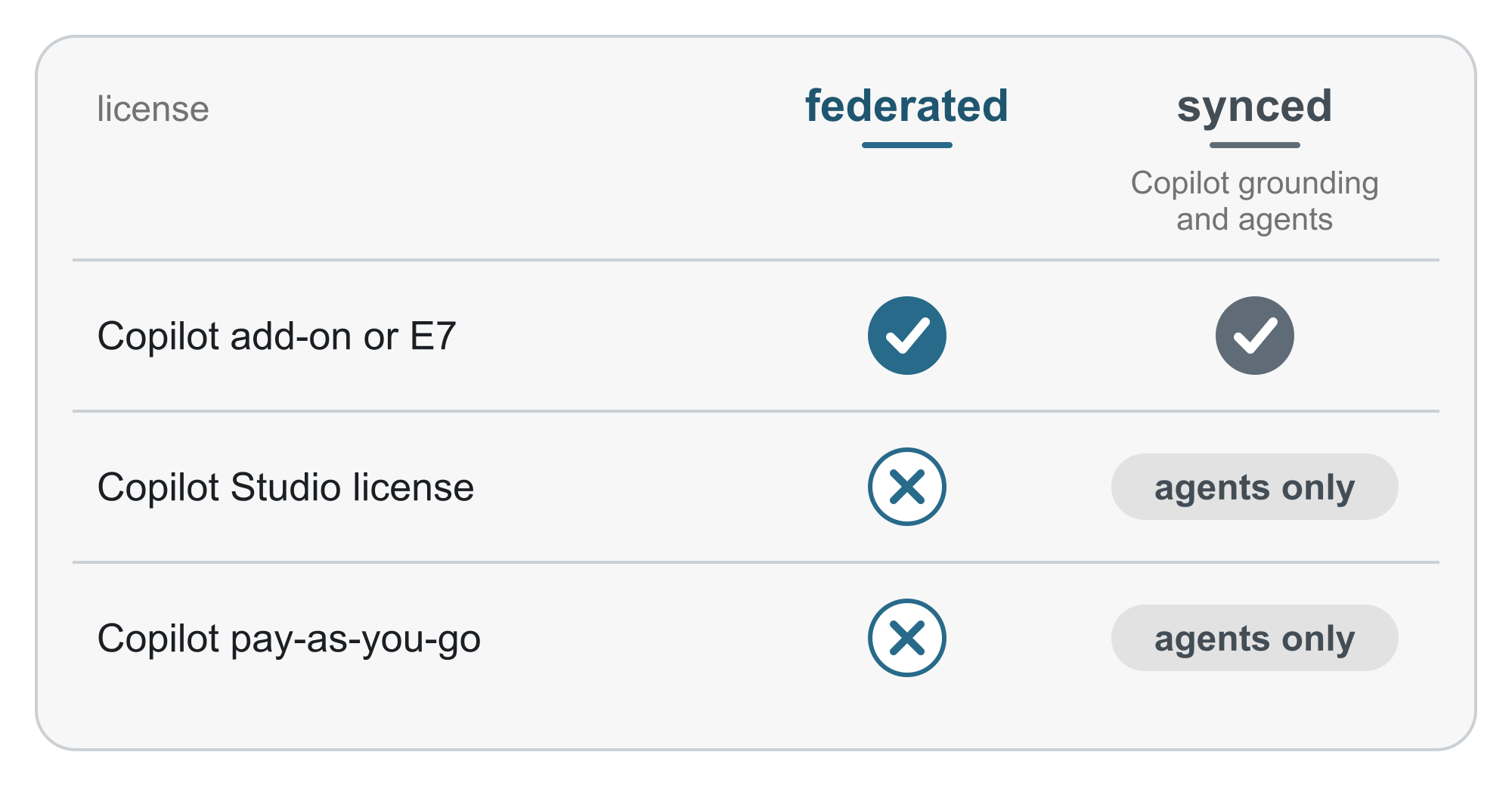 Simplified from the licensing table in the connector prerequisites.
In front of a private origin: hypotheses to test
If a federated connector is the only route, the origin can remain private. The decision is which layer to expose in front of it. The combinations below are deductions from separate product documentation, and none of that documentation describes them with Microsoft 365 Copilot. Treat them as hypotheses to test, not as supported architectures. Both still expose a public HTTPS endpoint. The question is which layer filters and authenticates traffic before it reaches the origin.
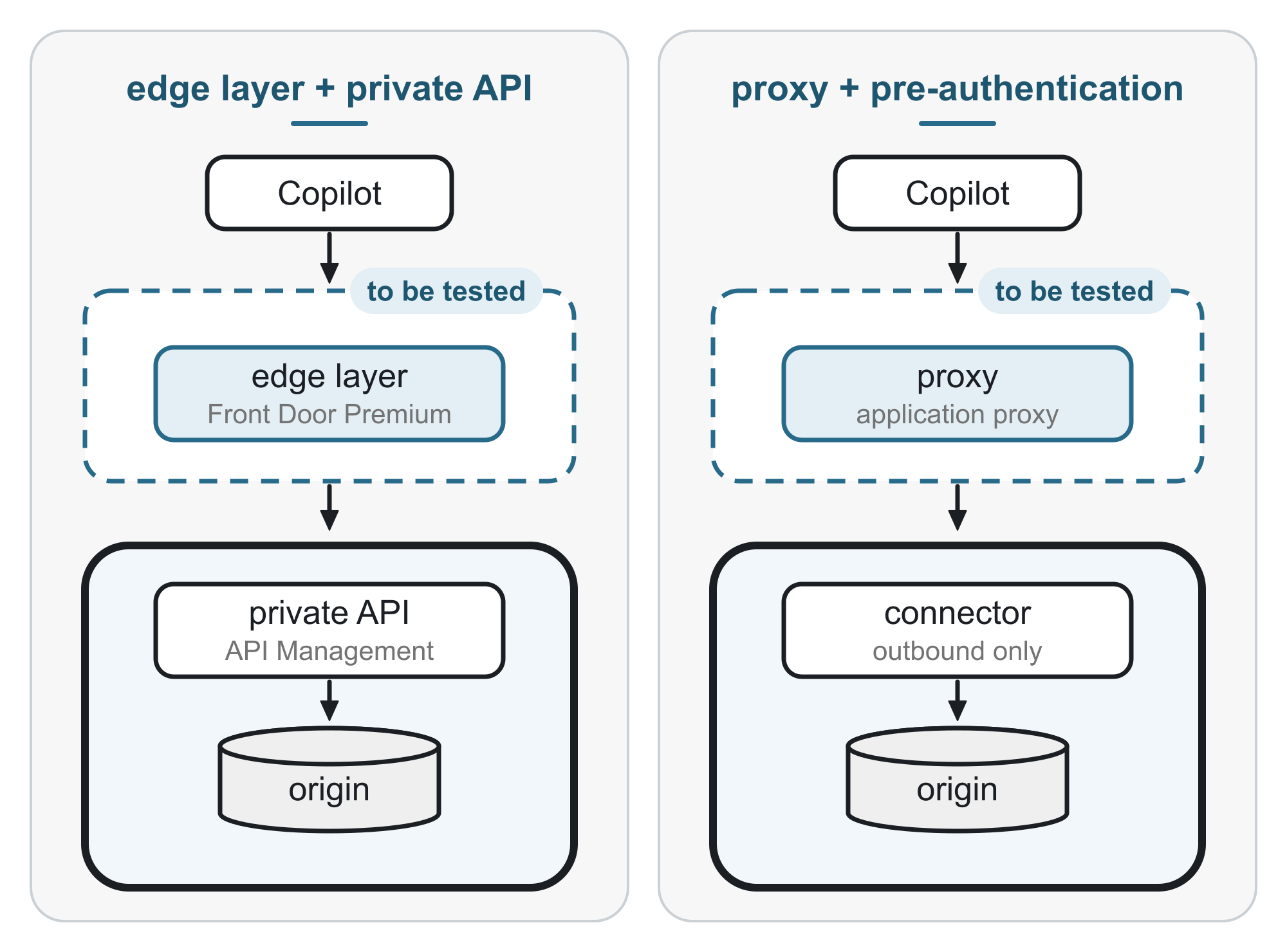 Combinations to test, not a supported architecture.
Azure Front Door Premium with a private Azure API Management origin. Secure your Origin with Private Link in Azure Front Door Premium says “Azure Front Door Premium can connect to your origin using Private Link”. What Is Azure Web Application Firewall on Azure Front Door? says Standard supports “only custom rules”, leaving managed rule sets to Premium. API Management’s validate-azure-ad-token policy “enforces the existence and validity of a JSON web token (JWT)” from Microsoft Entra. Connect Front Door Premium to an Azure API Management origin with Private Link states a condition for v1 tiers, public mode rather than virtual network mode, and does not mention v2 tiers.
Microsoft Entra application proxy with pre-authentication. Publish on-premises apps with Microsoft Entra application proxy says application proxy “blocks all traffic without a valid token for applications configured with preauthentication”. Its private network connectors “use only outbound connections”. Whether it accepts the identifier URI, redirect URI, and token store client that Configure Microsoft Entra SSO authentication requires in the app registration is not documented.
Azure Relay looks like a worse fit. The Azure Relay Hybrid Connections protocol guide says that, with Relay authorization enabled, an Authorization header without a Relay token elsewhere in the request “will be evaluated and stripped”. The service also returns a 504 “Gateway Timeout” after 60 seconds if it does not appear to handle the request.
What to ask the security team, in order
- Which restriction applies: a public inbound endpoint, or outbound access from our network? The answer separates the two models.
- Does the tenant have a Microsoft 365 Copilot add-on license or Microsoft 365 E7? If neither applies, federated connectors are not available, so the endpoint question ends there.
- Does the use case need live data, or is an indexed copy acceptable? An indexed copy points to a synced connector and, for on-premises data, the Microsoft Graph connector agent.
- If a public endpoint is acceptable, what sits in front of the origin, and which layer validates the token?
Two questions have no documented answer: whether Microsoft publishes an IP range or service tag for Copilot’s calls to federated connectors, which could allow filtering by origin, and whether the application proxy accepts the app registration settings required for Copilot single sign-on. On the first question, the Microsoft 365 page about connections into customer networks, Other endpoints not included in the Microsoft 365 IP Address and URL Web service, does not list a Copilot connector. That absence does not prove that no range or service tag exists.
Sources
- Submit a federated Microsoft 365 Copilot connector
- Federated connectors overview
- Prerequisites for deploying connectors
- Microsoft Graph connector agent overview
- Debug MCP and API plugins locally
- Secure your Origin with Private Link in Azure Front Door Premium
- What Is Azure Web Application Firewall on Azure Front Door?
- Connect Front Door Premium to an Azure API Management origin with Private Link
- validate-azure-ad-token policy
- Publish on-premises apps with Microsoft Entra application proxy
- Configure Microsoft Entra SSO authentication
- Azure Relay Hybrid Connections protocol guide
- Other endpoints not included in the Microsoft 365 IP Address and URL Web service
💬 Comments & Suggestions
Share your thoughts, tips, or drop a useful link below.