

“How many tools can an MCP server support?”
The question usually arrives as a request for a number. Someone is connecting a third-party server, its catalog is larger than expected, and a security team wants to know how the agent’s available actions will be restricted. A maximum would be convenient, but it answers neither the security question nor whether the agent can reliably choose the right tool.
 The small deliberate selection is the design. The large catalog behind it is the default.
The useful limit is not a number. Exposure is a budget with three separate accounts: the context spent describing capabilities, the selection accuracy the model can sustain across similar-sounding tools, and the governance you can actually enforce. Skills pay down the first. A connected agent pays down the second. Only an access control boundary pays down the third. Spending the wrong one is the mistake I keep running into.
This is about agents built in Microsoft Copilot Studio using the GitHub Copilot harness. The distinction matters, because advice inherited from the standard harness does not automatically describe this runtime.
The harness decides what reaches the model
Microsoft’s harness overview defines the term precisely:
The harness is a runtime that exists between the two: it determines when to call the model, what components to send it, interprets what comes back, and calls the right tools.
The phrase that matters is “what components to send it”. A documented runtime layer decides what reaches the model, so an agent’s configuration and a particular model request are not necessarily the same thing.
The documentation distinguishes three harnesses, and the GitHub Copilot one supports reasoning-heavy, multistep work: it “can take a goal, break it into steps, call the right tools across connectors, knowledge, MCP, and connected agents”. MCP is explicitly part of that orchestration surface.
The GitHub Copilot harness agent overview lists the configurable components: instructions, knowledge, tools and skills, model, connected agents, and memory. Read that list alongside “what components to send it” and the budget becomes easy to reason about. Every one of those, plus conversation context, makes a demand on the context used for orchestration.
That is an architectural reading. The pages do not specify prompt assembly or token allocation, so “prompt budget” here means the capability-selection burden at the primary agent, not a published internal format.
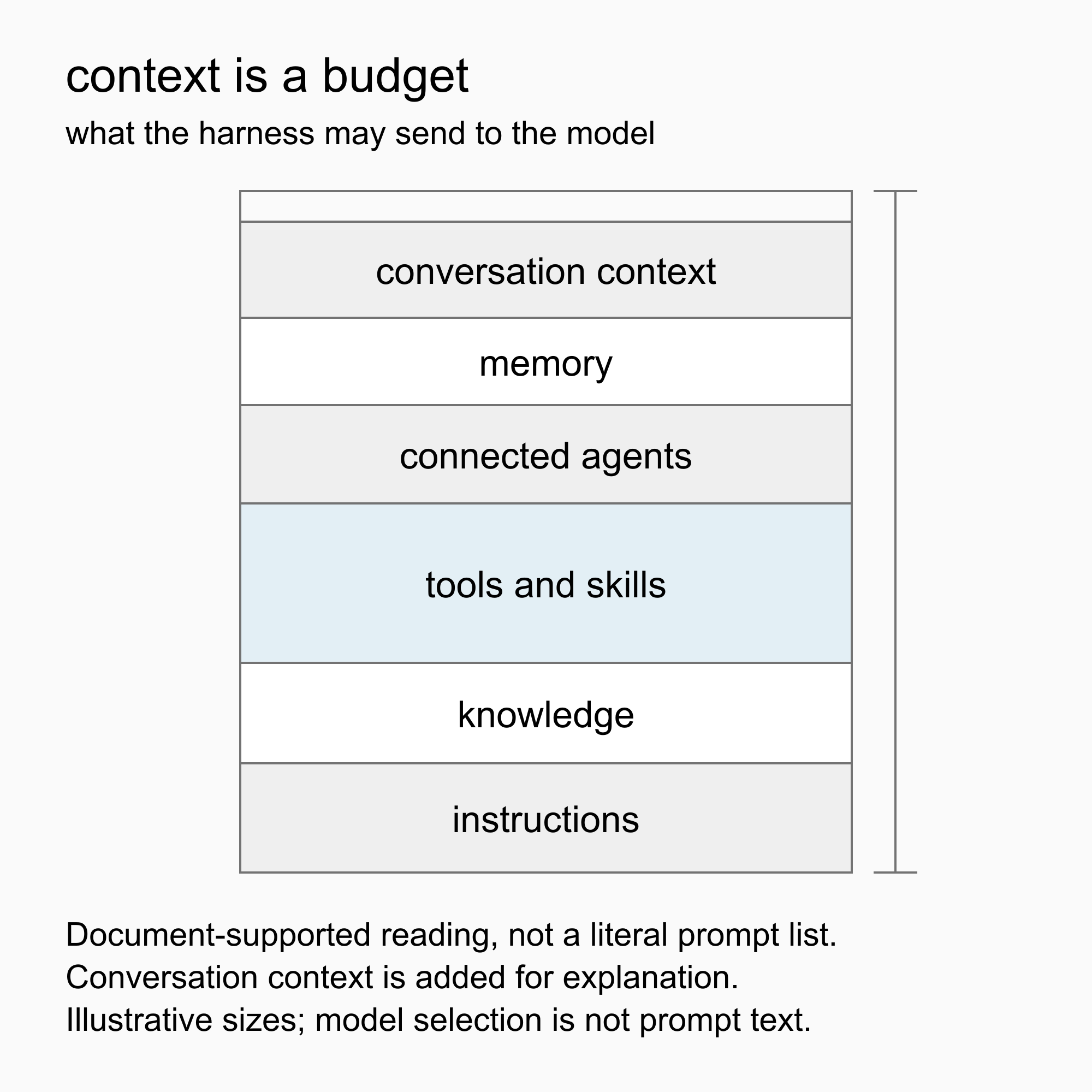 Conceptual composition, with illustrative segment sizes rather than measured token allocations. Conversation context is added for explanation and is not a separate component in the overview’s list.
Tool discovery does not establish a useful ceiling
The MCP tools specification does not define a universal cap on the number of tools a server can expose. Its discovery mechanism explicitly accommodates a catalog that spans multiple responses:
To discover available tools, clients send a tools/list request. This operation supports pagination
The request can carry a cursor; the response can return a nextCursor. A large catalog is an anticipated protocol shape, not an exceptional condition.
Implementations can still impose their own constraints, so this is no promise of unlimited capacity. It means a protocol-wide count is not the useful ceiling. Successful discovery tells you tools can be enumerated, not that the agent should receive all of them, or that a maker can individually govern each one.
Overlapping descriptions spend the selection budget
A larger tool surface can increase latency and reduce selection quality long before any hard limit is reached. Treat that as an engineering risk to measure rather than a documented performance curve, because the effect depends on what the runtime loads and how it selects.
The difficult case is not a long list. It is a list of names and descriptions that overlap. If several tools all promise to “manage records”, the model must infer distinctions the catalog should have made explicit. A lookup, an update and a deletion need descriptions that separate intent, scope and side effects.
The skills documentation states that well-written skill descriptions help the orchestrator invoke the right skill at the right time, and the same principle applies to tool descriptions. The standard-harness tools documentation names a tool’s name and description as selection factors, which supports the principle without establishing identical behavior here.
Evaluate the ambiguous cases: requests that sound similar but need different actions, and requests for actions outside the agent’s remit. A catalog that is technically discoverable can still be a poor decision surface.
Visible is not the same as invocable
There are three different questions here: what the interface renders, what the harness makes available to the model, and what execution controls allow to run. Evidence about one does not settle the others, and the consequential case is the mismatch: a tool sits outside the visible control surface but remains invocable.
That reverses the usual intuition about large catalogs. The risk is not the model picking the wrong visible tool. It is that per-action controls living only on rendered entries cannot reach a capability the maker never sees.
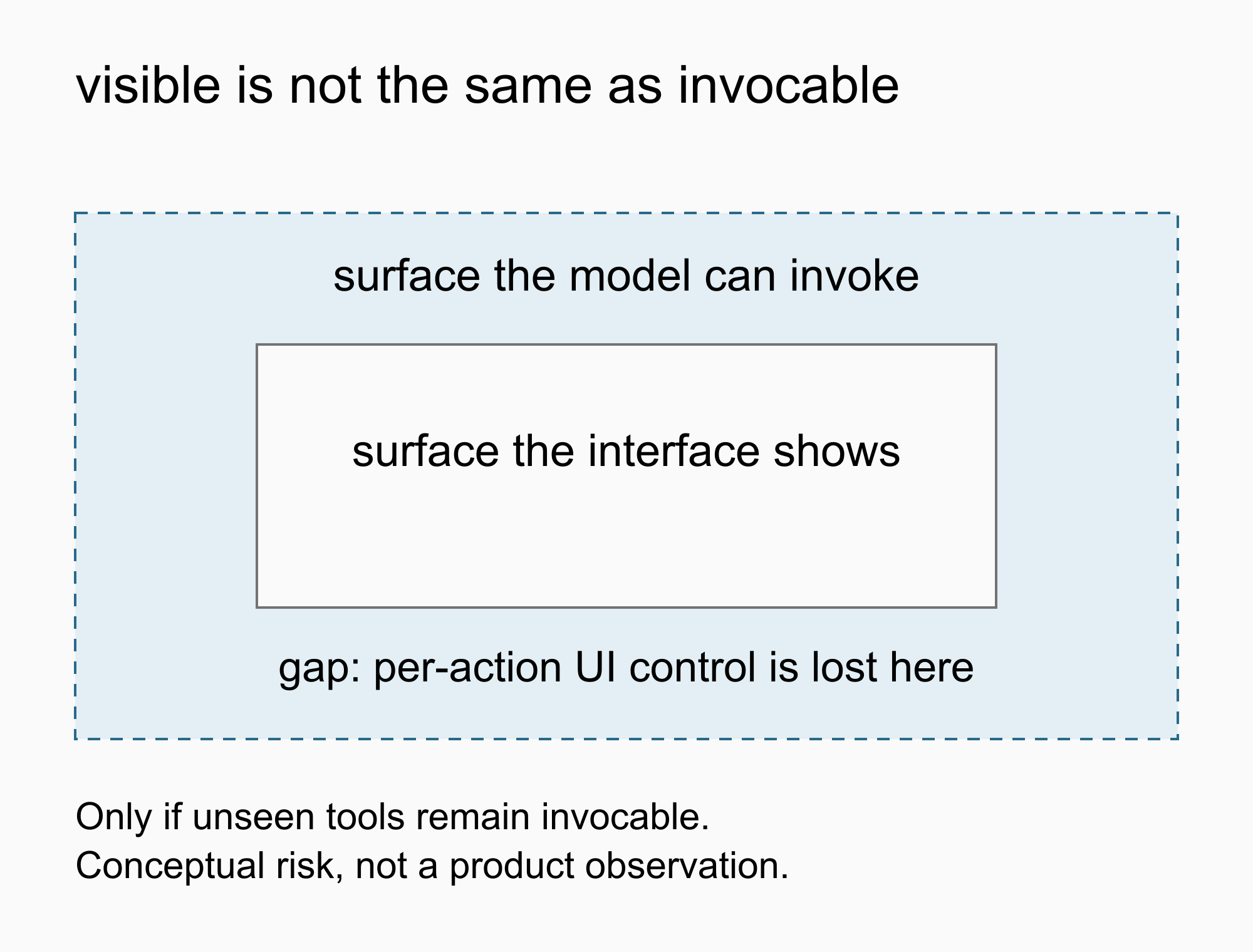 A conditional model. The gap exists only if tools omitted from the visible controls remain invocable.
The MCP specification’s user interaction model makes visibility part of human control:
For trust & safety and security, there SHOULD always be a human in the loop with the ability to deny tool invocations.
Applications SHOULD:
- Provide UI that makes clear which tools are being exposed to the AI model
- Insert clear visual indicators when tools are invoked
- Present confirmation prompts to the user for operations, to ensure a human is in the loop
My reading is that the visible surface is not cosmetic. It is one of the mechanisms that makes the ability to deny an invocation usable. An invocation-time approval works too, so a full catalog view is not the only option. But if an application offers neither, that recommendation has nowhere to operate. The specification uses SHOULD and mandates no particular interface, so this is a reading of the text rather than a finding about any product.
The tempting substitute for a control is an instruction: “Use only the read operations.” That expresses intended behavior, and it is weaker than an allowlist that rejects everything else regardless of what the model chooses. For a security review, keep the two claims apart. “The agent is instructed not to call this operation” and “this operation cannot execute under the agent’s effective permissions” are different controls, and the specification’s security considerations put access control on the server, not in prompt text.
So restrict exposure and execution wherever the integration supports enforcement, and test the denied operations as well as the permitted ones.
Skills do not contain an agent’s tools
In the standard-harness pattern, topics and child agents kept individual tool choices out of the parent’s immediate selection surface. The tools page documents explicit calls from topics, an option to stop a tool being dynamically selected, and child agents with their own orchestration and tool sets.
In the GitHub Copilot harness, skills look like the natural replacement. Their documented role is different:
Unlike tools, which connect to external services, skills are self-contained sets of instructions and logic that you can create, share, and reuse across agents.
The component comparison reinforces it. Tools are managed through connectors, APIs and MCP servers; skills through Markdown-based files or packages. A skill defines reusable behavior, not an orchestration context holding a private catalog. It “might instruct your agent to use a specific tool in a particular way”, and guidance about using a tool is not containment of it.
The older tools page adds that “Tools added to an agent are available for automatic orchestration throughout your agent’s conversations.” That page explicitly covers the standard harness, so treat it as background rather than documentation of this harness.
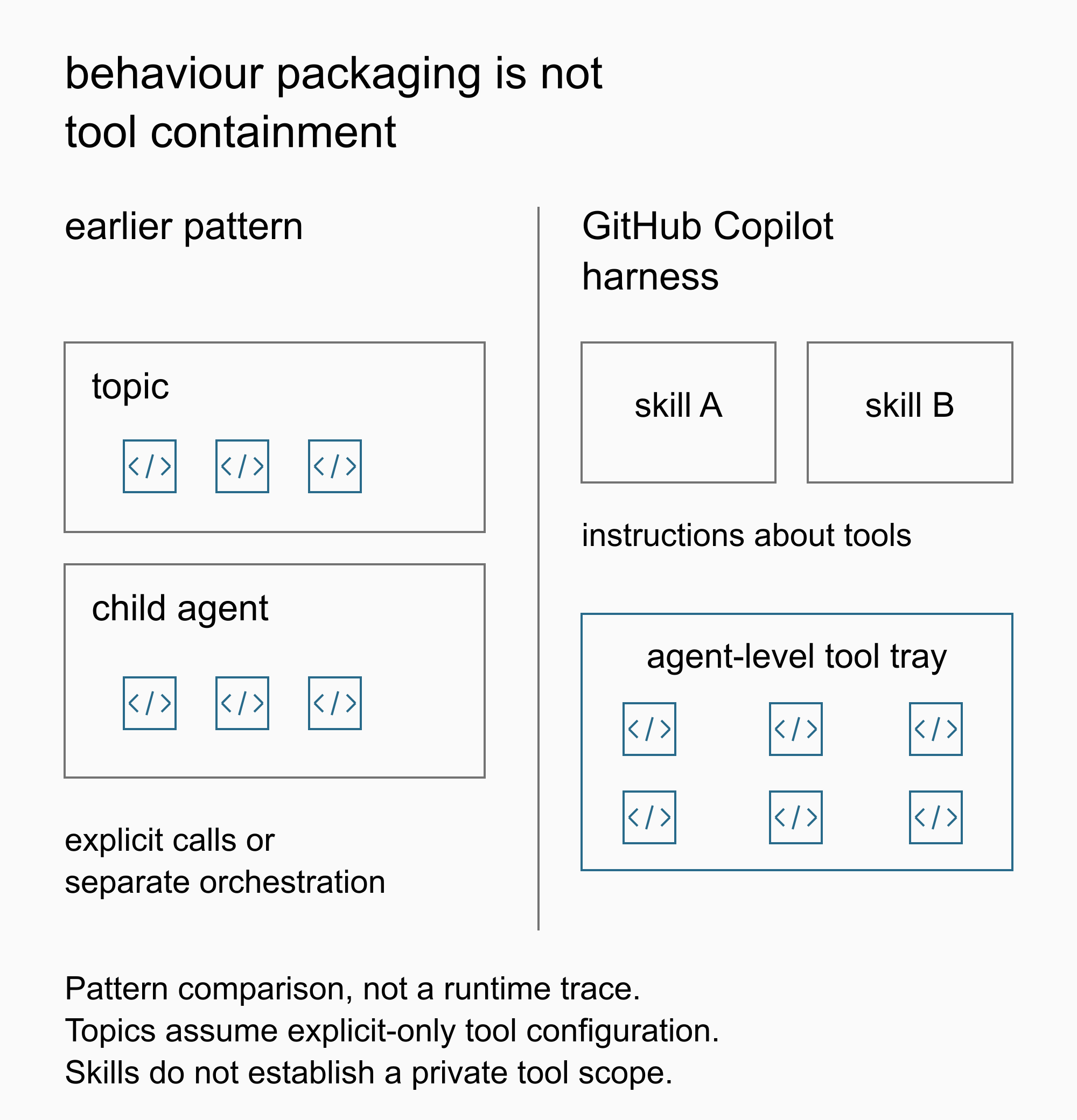 A comparison of design patterns rather than a runtime trace. On the right, skills organize behavior while tools remain separately configured capabilities.
What skills do provide is stated plainly in the skills overview:
Skills follow an open specification and implement a progressive disclosure pattern so agents load only the context they need, when they need it.
That is selective instruction loading, and it is genuinely valuable. It is not permission isolation for the tools a skill references. Add skills to organize behavior but leave the same tools attached to the primary agent, and the tool surface has not shrunk.
For tool scope, the connected agents documentation describes the boundary that has one:
The connected agent runs in its own orchestration context, with its own instructions, knowledge, and tools.
To get that separation you have to move the specialized tools to the specialist instead of keeping duplicate exposure on the primary agent. Delegation still costs context and processing, and an orchestration boundary is not automatically an authorization boundary.
The same page states the architectural recommendation, and a material restriction:
Scalability: Add new capabilities by connecting new agents rather than expanding a single agent’s instructions.
In the new agent experience, you can currently only connect other agents built in Copilot Studio.
As documented on September 18, 2026, a specialist already built on another platform cannot simply be connected this way. Check where the specialist runs before recommending connected agents.
Budget the exposed surface
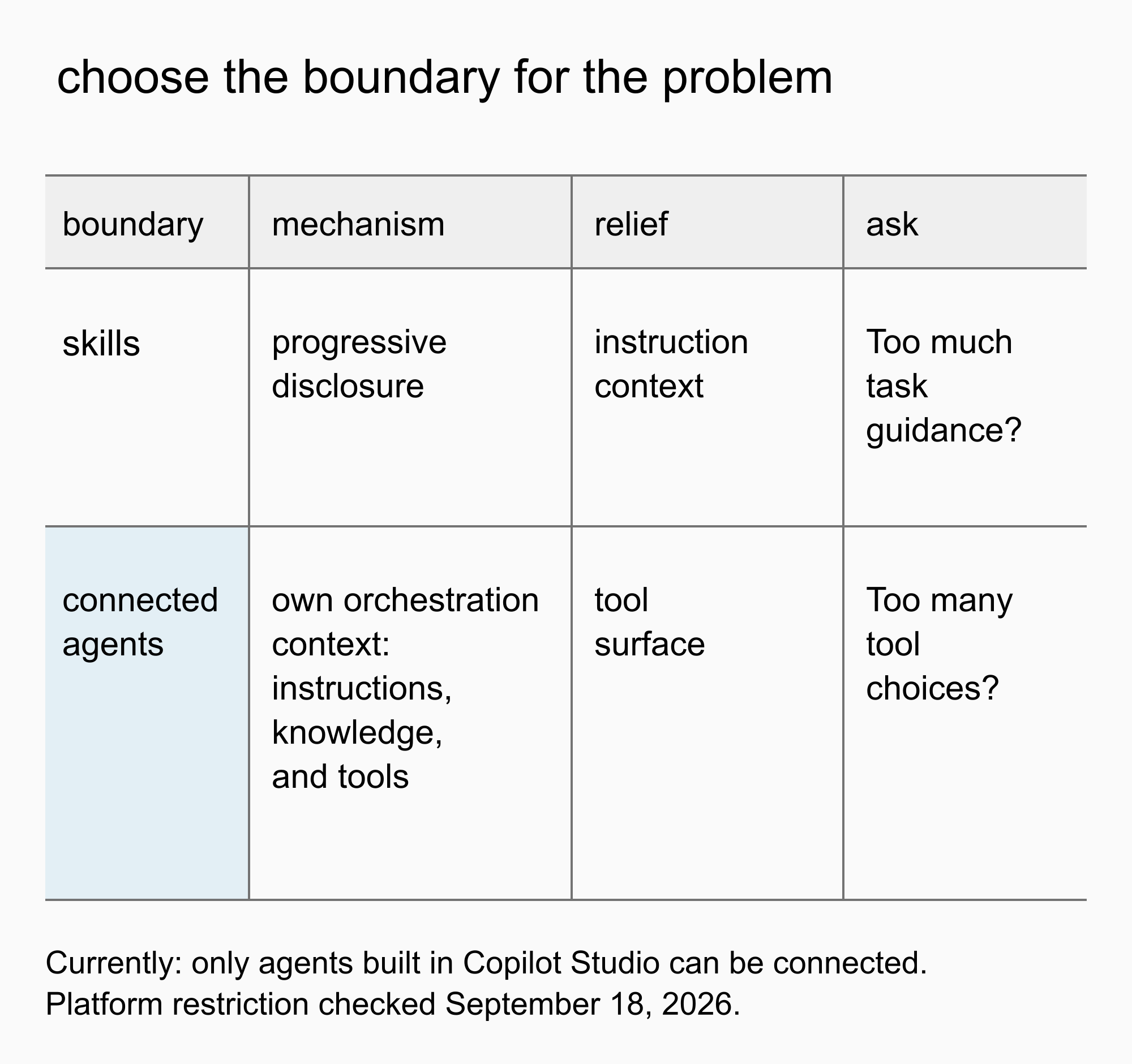 Choose by the problem: skills for instruction context, a connected agent for a separate tool surface. Connected agents are currently limited to agents built in Copilot Studio.
The decision rule is short. If the problem is instruction context, use skills. If the problem is tool scope, use another agent with its own orchestration context, where that connection is supported. If the problem is permission to execute, verify an enforceable access-control boundary. Applying instruction packaging to a tool-scope problem leaves the original accumulation exactly where it was.
The budget has a financial dimension too. The agent overview says usage-based billing applies to using, building, testing and evaluating agents, and that these might consume Copilot Credits. It does not establish a flat charge per attached tool. The cost I would actually assess is the resulting workload, including the tests needed to establish acceptable behavior.
So stop asking how many tools the API permits. A defensible design names the exposed actions, shows where disallowed ones are blocked, and uses the right boundary for the source of growth. Neither a tool count nor an instruction to behave carefully substitutes for that.
Sources
Documentation checked September 18, 2026. Product statements are grounded in the pages below; prompt composition, performance risks and governance consequences are architectural readings or design recommendations.
- Harnesses in Copilot Studio: runtime definition and MCP orchestration.
- Agents powered by the GitHub Copilot harness: configurable components and usage-based billing.
- Skills overview: progressive disclosure and component ownership.
- Connected agents overview: separate orchestration context and platform restriction.
- Add tools to custom agents: standard-harness tool scope. Not evidence of GitHub Copilot harness internals.
- MCP tools specification, revision 2025-06-18: paginated discovery, human control and access controls.
💬 Comments & Suggestions
Share your thoughts, tips, or drop a useful link below.